
Share this
by Mike Andrews on Nov 19, 2026, 8:00:01 AM
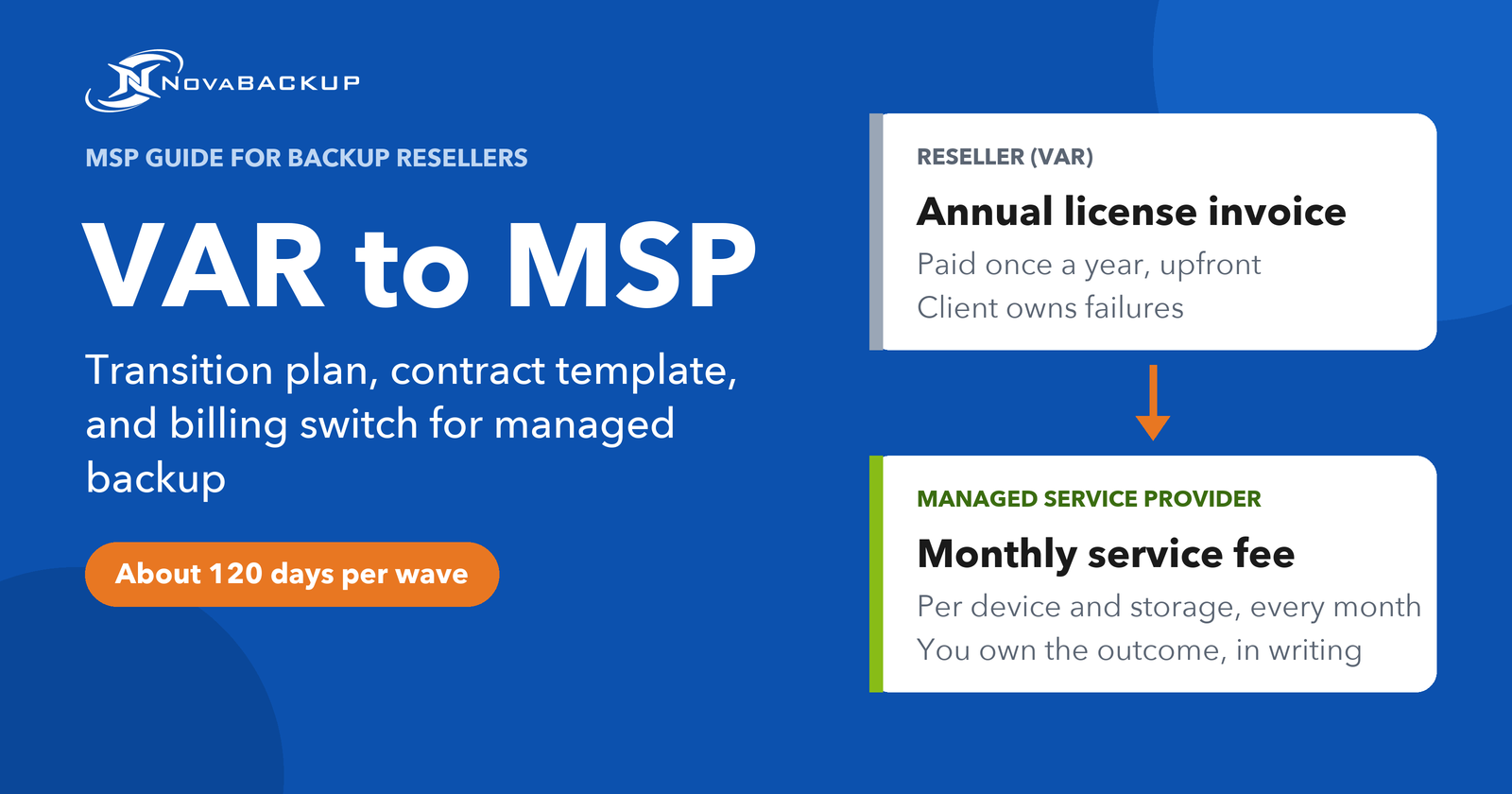
If you resell backup licenses today, you already do most of the work of a managed service provider. You configure the jobs, answer the calls when they fail, and run the restores.
Making the decision to charge for that work is the easy part. The hard part is moving your 20, 50, or 200 existing clients from a license on an annual invoice to a service on a monthly agreement without losing any of them and without stumbling over a cash-flow dip.
In this guide we cover the execution of moving to a managed backup model, from deciding who to convert first to the managed services agreement, and how billing changes. If you're still weighing whether the managed model even makes sense for you, start with the business case for managed backup.
Table of Contents
- The transition in five steps
- What Changes When a VAR Becomes an MSP
- A Scoring Model for Which Clients to Convert First
- Time Every Conversion to the Renewal Date
- The Managed Services Agreement: A Clause-by-Clause MSP Contract Template
- Switching Billing From License Invoices to Monthly Fees
- The 120-Day Transition Plan
- Example: Converting NovaBACKUP License Clients to Managed Backup
- Frequently Asked Questions
- Start With Three Clients
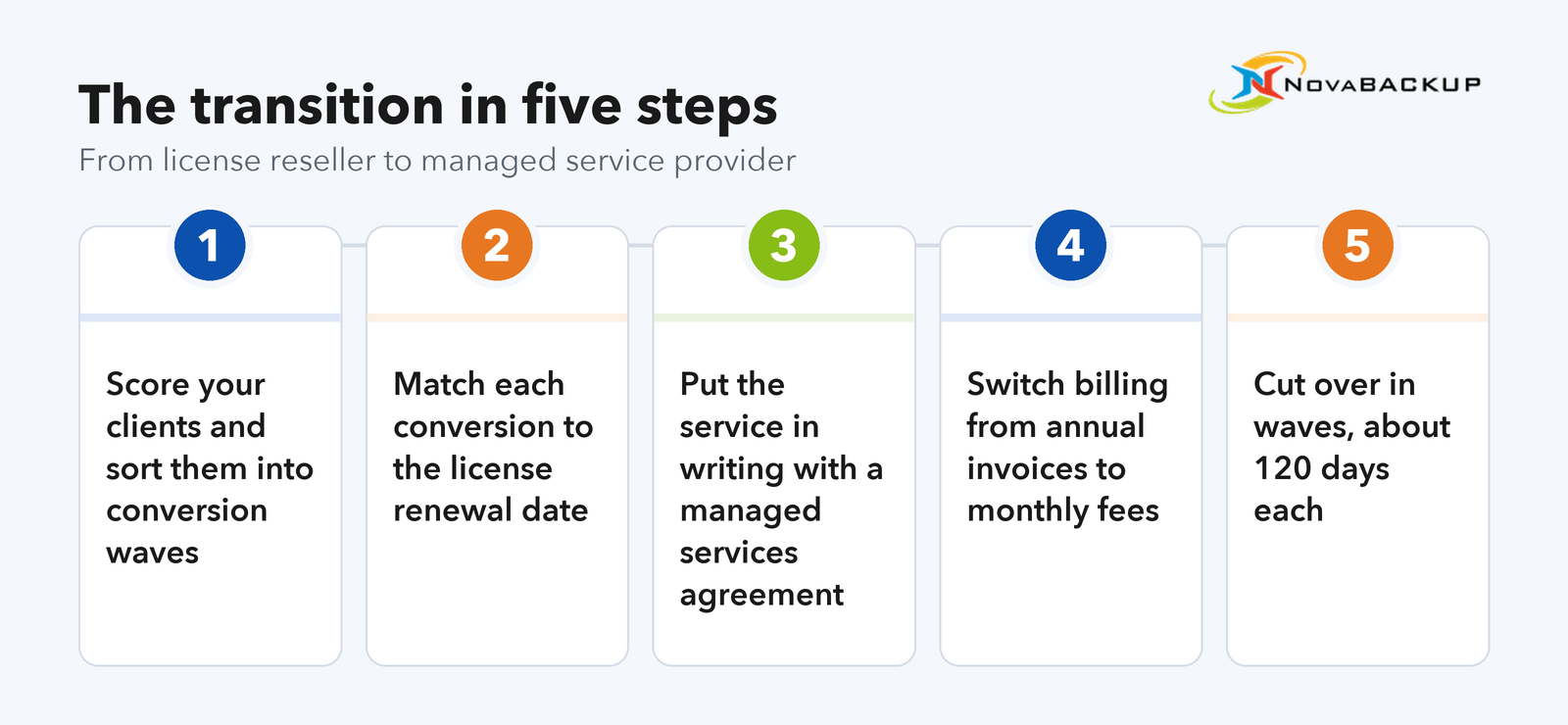
The transition in five steps
Five steps
Score your client base and sort clients into conversion waves.
Align each conversion to the client's license renewal date so nobody pays twice.
Put the service in writing with a managed services agreement and a backup service schedule.
Switch billing from annual license invoices to monthly service fees.
Cut over in waves over roughly 120 days per wave, with a documented restore test in the first week after cutover.
What Changes When a VAR Becomes an MSP
Switching to an MSP business model barely changes your day-to-day technical work. What changes is how you sell, what you sign, how you invoice, and what you're liable for. Each row below needs a decision:
| Reseller (VAR) | Managed service provider | |
| What the client buys | A license key and storage | A defined backup and recovery outcome |
| Contract | Vendor EULA plus your quote | Your managed services agreement plus a service schedule |
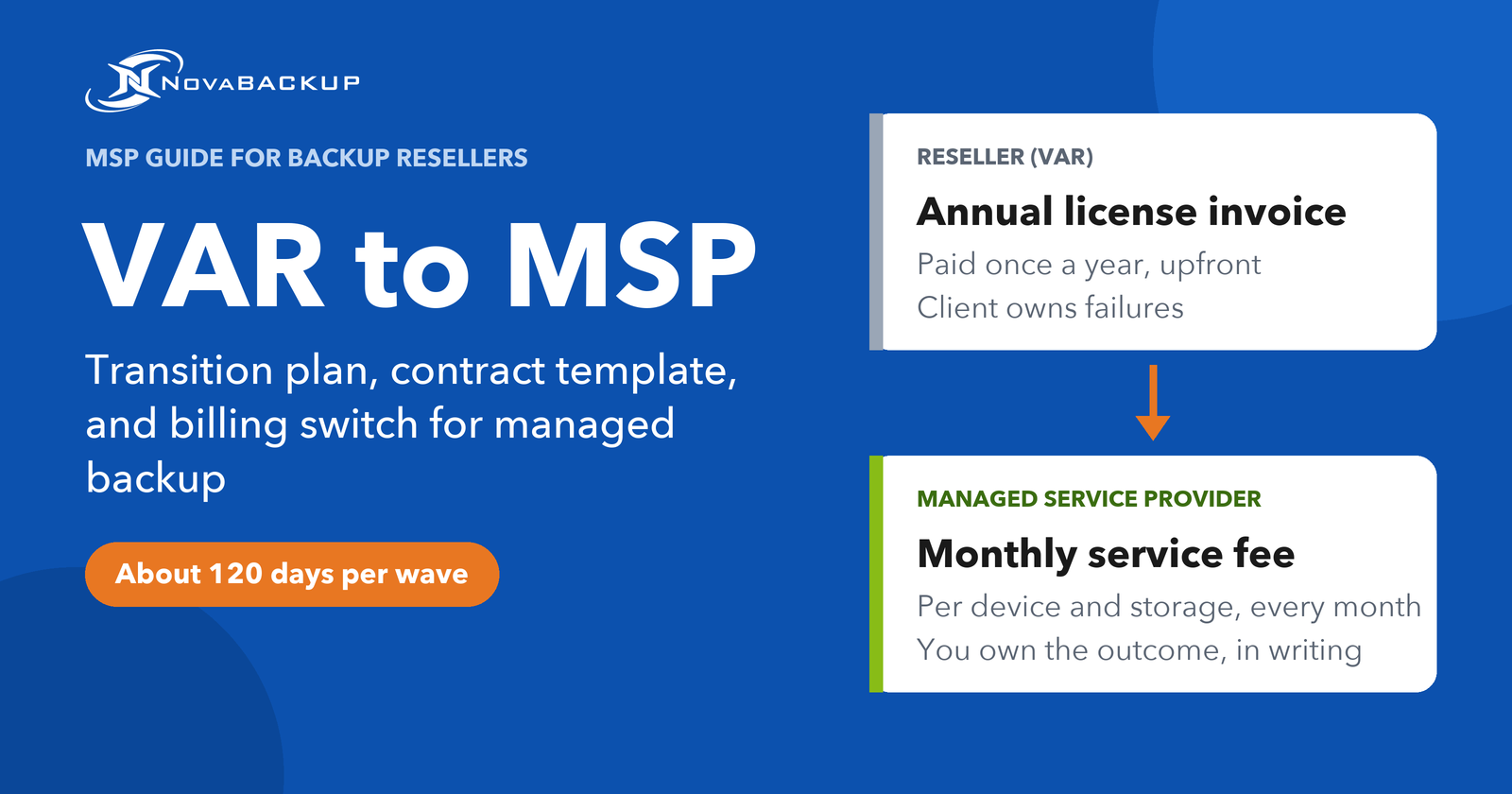
| Billing | Annual invoice, paid upfront | Monthly fee, per device and storage |
| Who owns failures | The end user, who bought and owns the license | You, within a written scope |
| Renewal | A sales conversation every year | Auto-renewing term with a notice period |
| Offboarding | Undefined | Data handover and deletion terms in the contract |
| Your stack | Whatever the client bought | Your standard platform and configuration |
Two of these deserve special attention:
Liability moves to you. As a reseller, a failed restore is the client's problem, and you help where you can. As an MSP, it's a breach of a service commitment. That's why the contract section of this guide spends most of its length on scope and exclusions.
Your stack becomes non-negotiable. A managed service only scales when every client runs the same platform with the same baseline configuration. Clients on a different backup product either migrate to yours as part of the conversion or stay on a reseller arrangement.
A note on terms: a cloud backup reseller program lets you resell a vendor's storage and licenses under the vendor's terms. Running a managed backup service means you set the terms, the price, and the service levels, and the vendor supplies the platform underneath.
A Scoring Model for Which Clients to Convert First
Convert clients in a deliberate order. Start with the ones where the switch is easiest to justify and least likely to go wrong. Your first conversions become the process every later conversion follows, so pick them on data instead of on who you happen to talk to next.
Pull six data points per client
Export these from your PSA, ticketing system, and backup console into one sheet, one row per client:
- License renewal date. Annual subscription expiry, or the date maintenance lapsed on a perpetual license.
- Unbilled backup hours in the last 12 months. Filter tickets by backup-related categories or keywords (failed job, restore, storage full) and sum the time on tickets you didn't invoice.
- Regulatory exposure. HIPAA, GDPR, financial record retention rules, or an active cyber insurance policy with backup requirements.
- Backup health. Failed or warning jobs in the last 90 days, missing offsite copy, outdated software version, no restore test on record.
- Stack fit. Does the environment already match your standard platform and configuration, or will conversion include a migration?
- Decision path. One owner who signs, or a committee, a parent company, or a procurement process.
Score each client on readiness and value
The clients who need managed backup most are rarely the easiest ones to convert first. To decide who to move first, score each client on two separate axes, from 1 to 3 points per criterion. Readiness measures how smoothly the conversion will go and when a client can convert. Value measures how much the client could gain and how strong your case is, for example through unbilled hours, backup gaps, or compliance requirements.
| Axis | Criterion | 3 points | 2 points | 1 point |
| Readiness | Renewal timing | Renewal 3 to 6 months out, or maintenance already lapsed | 6 to 12 months out | Under 90 days out, too little lead time for the 120-day plan |
| Readiness | Stack fit | Already on your standard platform | Same platform, different configuration | Different product, needs migration |
| Readiness | Decision path | Owner decides alone | Two people involved | Committee or procurement |
| Value | Unbilled backup hours (12 months) | More than 10 hours | 4 to 10 hours | Under 4 hours |
| Value | Backup health | Repeated failures or no offsite copy | Occasional warnings | Clean, tested |
| Value | Regulatory exposure | Regulated industry or cyber insurance requirements | Some retention obligations | None known |
Assign waves
Four groups, in this order
Wave 1, pilot (2 to 3 clients): readiness 8 or 9, value 6 or lower. Standard stack, one decision-maker, enough lead time before renewal, and no regulated data. These clients test your agreement, your billing setup, and your cutover checklist.
Wave 2: value 7 or higher, readiness 6 or higher. Regulated clients and clients with known backup gaps. They have the most to gain from documented restore tests and reporting, and they convert once the pilot has proven your process. The conversation is about risk instead of price.
Wave 3: everyone else with readiness 5 or higher. Converted at their renewal date, using the process the first two waves refined.
Hold list: readiness 3 or 4. Clients on a different product who refuse to migrate, price-only buyers, and environments too customized to standardize. Offer them a lighter tier without restore commitments, keep them on a reseller arrangement until the license runs out, or end the relationship.
A client whose renewal is less than 90 days out moves to the following renewal, or converts early with a credit for the remaining license time (see the renewal section below).
Adjust the thresholds to your client base and write down the order before you start making calls.
Converting break-fix clients vs. license clients
Break-fix clients have no license to time a conversion against. Make the offer at the next incident, at the next hardware refresh, or in a scheduled review. Bring their last 12 months of invoices for backup-related work and compare that spend with a fixed monthly fee.
You also don't need to stop doing break-fix work to start. Run both models side by side and move clients over one at a time.
From break-fix to managed services: MG Technology. Michael Gustine ran MG Technology on on-site break-fix work for over 20 years. He now runs a bundled monthly package of NovaBACKUP Managed Backup, endpoint protection, and remote management, while still taking break-fix jobs for clients who haven't moved yet. He monitors all local and cloud backups from his desk and targets 17 to 25% growth in his backup client base without adding staff. Read the MG Technology case study.
Time Every Conversion to the Renewal Date
The cleanest conversion replaces the license renewal with the first month of service, so the client never pays for both. Don't count on your vendor crediting unused license time when a client moves to a different licensing model. The renewal date is the point where switching costs nothing.
How you handle each license type:
| License situation | When to convert | How to handle the overlap |
| Annual subscription, renewal less than 90 days out | At the following renewal, or now if the client has an urgent gap | Renew one more term, or convert now and credit the remaining license value on the first invoices yourself |
| Annual subscription, renewal 3 to 6 months out | At renewal | None. The service fee replaces the renewal invoice |
| Annual subscription, renewal more than 6 months out | At renewal, or earlier if the client has an urgent gap | If you convert early, either start the service fee at the old expiry date or credit the remaining license value yourself |
| Perpetual license, maintenance current | At the next maintenance renewal | None. The service fee replaces the maintenance invoice |
| Perpetual license, maintenance lapsed | Now | None. The client is running an unsupported version, which is your opening |
| Break-fix, no license | Next incident, refresh, or review | None |
| Different vendor's product | At that product's renewal, with migration scoped | Keep the old product's backup sets readable until your retention covers the same window (see the 120-day plan below) |
Start 90 to 120 days before renewal. Subscriptions often auto-renew with a 30-day reminder. If you start talking at the reminder, you'll either renew one more year of the license or rush the agreement. Starting 90 to 120 days out gives you time for the health check, the proposal, signature, and cutover, as laid out in the 120-day plan below.
Absorb small overlaps instead of negotiating them. If a client has two months left on a license, crediting that value on the first service invoice costs you little and removes the objection entirely. Write the credit as a one-time line item so it doesn't reset the client's expectations for the monthly fee.
The Managed Services Agreement: A Clause-by-Clause MSP Contract Template
A managed services agreement for backup has to answer one question in writing before anything goes wrong: what exactly are you responsible for, and what are you not? The sample clauses give you a starting point, but make sure to replace everything in brackets with your own values.
This section is meant as a template, not legal advice. Have a lawyer licensed in your clients' jurisdiction review your final agreement, particularly the liability and data protection clauses.
Structure the paperwork in layers
Split the agreement into a master document and service-specific schedules. You sign the master terms once. When you add a service later, you add a schedule instead of renegotiating the whole contract.
| Document | What it covers | Signed |
| Master services agreement (MSA) | Payment terms, term and termination, liability, confidentiality, governing law | Once per client |
| Schedule A: Managed Backup | Scope, exclusions, service levels, retention, restore testing, fees for this service | Per service |
| Appendix A1: Protected systems | Table of every system, workload, and backup setting covered | Updated whenever systems change |
| Data processing agreement (DPA) or business associate agreement (BAA) | How you process personal data or protected health information on the client's behalf | Once, where the law requires it |
The clauses below belong in Schedule A unless marked otherwise.
1. Scope of service
List every activity you perform. Anything not listed is out of scope. To name specific out-of-scope items, use the exclusions clause in Section 3.
Sample clause
Provider will (a) deploy and configure backup software on the systems listed in Appendix A1; (b) monitor backup jobs on business days and respond to failed or missed jobs within [4] business hours; (c) perform restore tests according to Section 7; (d) deliver a monthly service report; and (e) perform data restores on request according to Section 4.
2. Protected systems (Appendix A1)
This table is the most important part of the agreement. A common source of backup disputes is data that was never in a backup set. If a system or folder isn't in the appendix, it isn't covered.
| System | Workload | Backup type | Frequency | Local retention | Cloud retention | RPO target | RTO target |
| SRV-01 | File server | Files + system image | Daily | 30 days | 90 days | 24 hours | 4 hours |
| SRV-02 | SQL (practice management) | Application-consistent SQL | Every 4 hours | 30 days | 90 days | 4 hours | 8 hours |
| WS-01 to WS-08 | Workstations | User folders | Daily | None | 30 days | 24 hours | 1 business day |
For how to set realistic RPO and RTO values per workload, see What Managed Backup Actually Looks Like in Practice.
Sample clause
Only systems, data sets, and settings listed in Appendix A1 are covered by this Schedule. Client must notify Provider in writing of new systems, applications, or data locations. Provider will update Appendix A1 within [5] business days of notification, and any resulting fee change takes effect in the next billing period.
3. Exclusions
Write exclusions as specifically as the scope. Vague exclusions get read in the client's favor.
Sample clause
This Schedule does not cover: (a) data not listed in Appendix A1; (b) data deleted or corrupted before the service start date or outside the retention periods in Appendix A1; (c) SaaS application data, including Microsoft 365 and Google Workspace, unless listed in Appendix A1; (d) repair or replacement of Client hardware; (e) failures caused by Client's internet connection, power, or third-party software; and (f) more than [2] restore requests per month, which are billed at Provider's hourly rate.
4. Service levels
Phrase RPO and RTO as targets with stated conditions. An unconditional guarantee makes you liable for factors you don't control, such as the client's bandwidth or a replacement server that takes a week to arrive.
Sample clause
Provider will make commercially reasonable efforts to meet the RPO and RTO targets in Appendix A1. RTO targets begin when Provider confirms the restore request and assume (a) replacement hardware or a virtual host is available, (b) Client's internet connection operates at its contracted bandwidth, and (c) Client provides required access within [1] hour of request. Restore requests are acknowledged within [2] business hours, or [1] hour for requests flagged as emergencies under this Section.
Define what counts as an emergency (for example, a full system outage or a ransomware incident) and what after-hours support costs, if you offer it.
5. Client responsibilities
This clause protects you against the most common reason of backup gaps caused by human error or when the client changes something and doesn't tell you.
Sample clause
Client will (a) notify Provider before adding, moving, renaming, or decommissioning systems, applications, or data locations; (b) maintain the hardware, operating systems, and internet connection on which the service runs; (c) provide administrative access required to perform the service; (d) designate an authorized contact who can request restores and approve changes; and (e) not modify backup configurations without Provider's written approval.
6. Retention, storage location, and encryption keys
State where the data lives and who holds the encryption key. If you hold the key and lose it, encrypted backups are unrecoverable. If the client holds it and loses it, the same applies, and the contract should say who carries that risk.
Sample clause
Backup data is stored on [local storage at Client premises] and in [cloud storage hosted in the United States / Germany / Canada]. Backup data is encrypted with AES-256 in transit and at rest. Provider stores the encryption key in [Provider's credential vault] and provides a copy to Client's authorized contact on written request. Provider is not liable for data that cannot be decrypted because a key held by Client was lost.
7. Restore testing and reporting
This is the clause that separates a managed service from a monitored license. Commit to a cadence you can sustain across every client. For a full testing schedule, see Building and Running Your Managed Backup Service.
Sample clause
Provider will perform a file-level restore test at least monthly and a full system restore test at least [quarterly] for each server listed in Appendix A1. Each test is documented with date, system, restore type, result, and recovery time. Provider will deliver a monthly report summarizing backup job results, storage used, restore tests performed, and incidents resolved.
8. Fees and billing
The billing mechanics are covered in detail in the next section. In the contract, fix the units, the minimum, and how changes take effect.
Sample clause
Fees are billed monthly per protected server, per protected workstation, and per GB of cloud backup storage as listed in the fee table. A minimum monthly fee of [amount] applies. Devices added during a month are billed pro rata from the date of addition. Storage is billed in arrears based on the average stored volume for the month. Restores beyond the included number and work outside the scope of this Schedule are billed at [hourly rate]. Invoices are due within [15] days.
Add an annual price adjustment clause as well. The reasoning is covered in Pricing, Positioning, and Winning New Customers.
9. Term, renewal, and termination (MSA)
Sample clause
This Agreement starts on the service start date and runs for an initial term of [12] months. It renews automatically for successive [12]-month terms unless either party gives written notice at least [60] days before the end of the current term. Either party may terminate for material breach not cured within [30] days of written notice.
10. Offboarding and data return
The clause clients ask about least and need most. Defining it upfront also makes your service easier to sell, because it removes the fear of lock-in.
Sample clause
On termination, Provider will, at Client's choice, (a) deliver the most recent backup of each system in Appendix A1 in [a restorable format / on Client-provided storage] within [15] business days, or (b) maintain existing backup data read-only for up to [90] days at the then-current storage rate. After that period, Provider will delete all Client backup data and confirm deletion in writing. Offboarding work beyond [4] hours is billed at Provider's hourly rate.
11. Declined services acknowledgment
When a client refuses part of your standard setup, such as the offsite copy or protection for a specific system, get it in writing. Attach it as a signed form instead of burying it in the agreement.
Sample acknowledgment
Client has been advised by Provider to [maintain an offsite backup copy / back up the system named below]. Client has declined this recommendation. Client understands that data affected by this decision may be unrecoverable after hardware failure, site loss, or a security incident, and releases Provider from liability for such loss. Declined item: [description]. Signed: [name, title, date].
12. Limitation of liability (MSA)
Cap your liability and exclude indirect losses. Without a cap, a single failed restore at a client with high downtime costs could exceed everything you've earned from that client.
Sample clause
Except for breaches of confidentiality or data protection obligations, each party's total liability under this Agreement is limited to the fees paid by Client in the [12] months before the event giving rise to the claim. Neither party is liable for indirect, incidental, or consequential damages, including lost profits or lost revenue.
Caps and exclusions are enforced differently by jurisdiction. In Germany, for example, liability for gross negligence and intent cannot be excluded in standard business terms. This is the clause to have reviewed locally.
13. Data processing agreement or business associate agreement
Backups contain personal data, so most clients will need a second document:
- EU and Germany: Under GDPR Article 28, you act as a processor and need a written data processing agreement (in Germany, an Auftragsverarbeitungsvertrag or AVV). It covers the subject matter and duration of processing, technical and organizational security measures, and the use of subprocessors, which includes your backup vendor's cloud storage.
- US healthcare: If you store protected health information for a HIPAA covered entity, such as a dental or medical practice, you're a business associate and need a signed business associate agreement before you touch the data.
List your backup vendor as a subprocessor or subcontractor, including where its cloud storage is hosted.
Switching Billing From License Invoices to Monthly Fees
Moving to a managed services pricing model changes four things in your billing: the unit you charge for, the invoice cadence, where usage data comes from, and your cash flow. Decide each one before the first converted client gets an invoice.
This section covers the mechanics. For price points and tiers, see Pricing, Positioning, and Winning New Customers. For the trade-offs between billing per endpoint and per GB, see Mike Andrews' article on per endpoint vs. per GB pricing.
Pick your billing units
Most managed backup services bill on three units: protected servers, protected workstations, and cloud storage. Keep the units identical across every client so anyone on your team can quote and invoice without a custom calculation.
- Devices: a flat monthly fee per server and per workstation, covering monitoring, testing, and reporting.
- Storage: passed through per GB with your margin added, or included as a fixed allowance per device with overage above it.
- Minimum monthly fee: protects you from clients whose device count is too small to cover the fixed cost of monitoring, reporting, and testing them.
Option: Bill devices in advance and storage in arrears
One way to soften the switch is to split the invoice. Device counts are known at the start of the month, so you can bill that part in advance and collect it before the work happens, which offsets part of the cash-flow dip described below. Storage changes daily, so it's billed in arrears from the actual usage of the month that just ended. If you'd rather keep one simple invoice, billing everything in arrears works too. Either way, state in the agreement which storage figure you bill on, for example, the month-end value, the monthly average, or the peak. Average is the fairest to the client. Month-end is usually the easiest number to get. Whichever you pick, match the figure your vendor bills you on, so the reconciliation described below works.
If you bill devices in advance, prorate devices added mid-month by calendar days. For example, a workstation added on day 16 of a 30-day month at $15 per month is billed at $7.50 for that month and the full rate after.
Example: One client, before and after
A dental practice with one server, six workstations, and 400 GB of cloud backup storage. Prices are examples, not recommendations.
| Line item | Old annual license invoice | New monthly service invoice |
| Server | Server backup license renewal: $400 | Managed backup, server, 1 × $100: $100 |
| Workstations | 6 workstation licenses × $150: $900 | Managed backup, workstation, 6 × $15: $90 |
| Storage | Included in license | Cloud backup storage, 400 GB × $0.10 (previous month): $40 |
| Support for backup issues | Billed hourly, or absorbed | Included |
| Total | $1,300 once per year | $230 per month ($2,760 per year) |
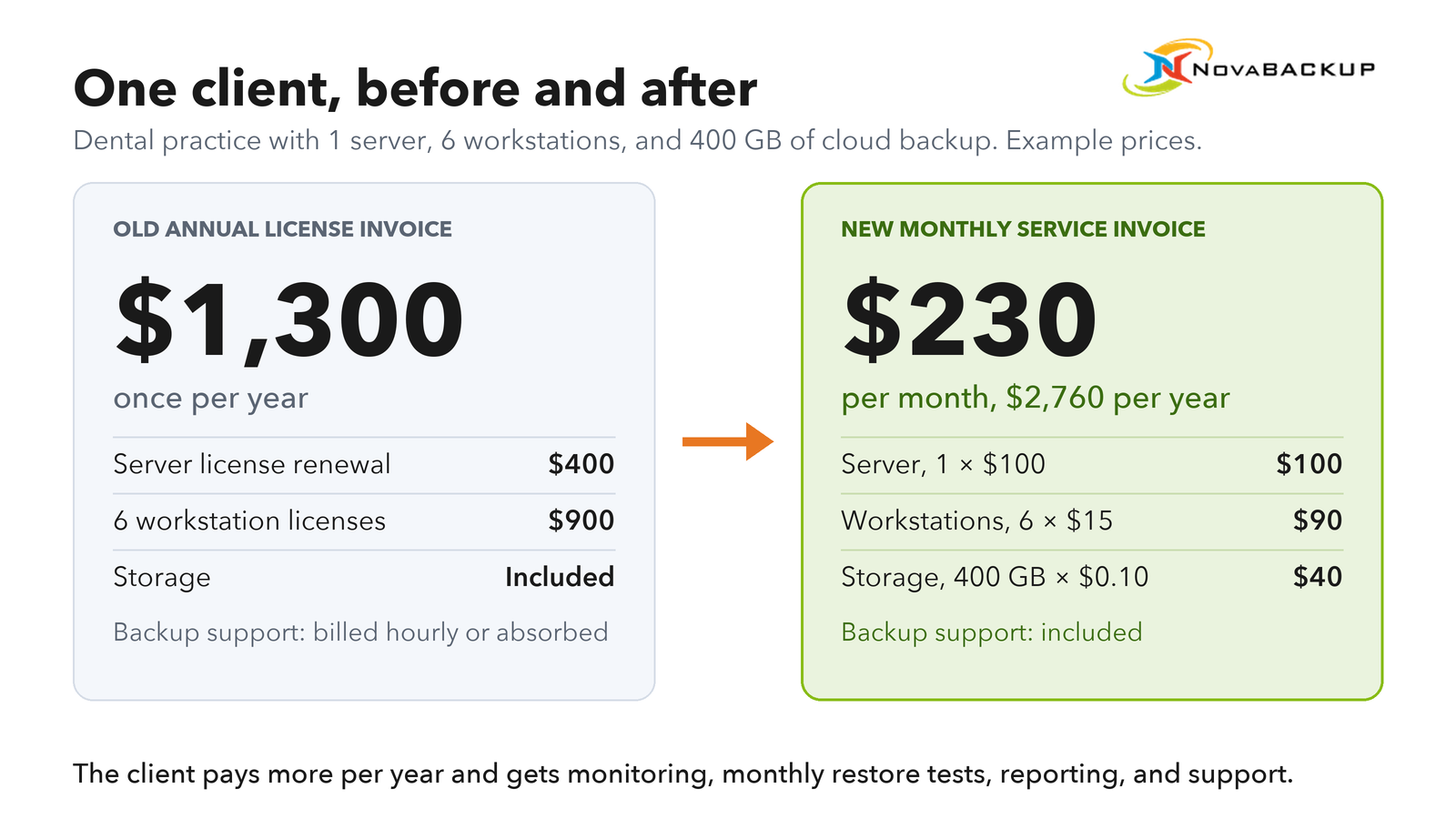
The client pays more per year and gets monitoring, monthly restore tests, reporting, and support that used to be either extra or unbilled.
Plan for the cash-flow dip
The example client used to pay $1,300 upfront at renewal. In the first month of service, they pay $230. Across a wave of ten similar clients converting in the same month, you collect $2,300 that month instead of $13,000, and $6,900 over the first quarter instead of $13,000. Annual revenue from the same ten clients still rises from $13,000 to $27,600.
Three ways to manage it:
- Stagger the waves so conversions spread across several months instead of landing in one renewal season.
- Offer annual prepayment of the service fee, with a small discount, to clients who prefer one invoice per year.
- Keep the first wave small. Two or three clients won't move your cash position while you test the process.
Invoice from the console's usage data
Your backup platform should report device counts and stored volume per client. Pull that report on the same day every month, and invoice from it. Then reconcile. The vendor's invoice to you should match the sum of usage across your client invoices. A gap means a client is using storage or devices you're not billing for.
If you run a PSA or billing tool, automate the transfer through the backup platform's API instead of copying numbers by hand.
The 120-Day Transition Plan
Each conversion wave runs about 120 days from first preparation to the first invoice review. Start the next wave only after the previous one has completed its first restore test and first invoice without issues.
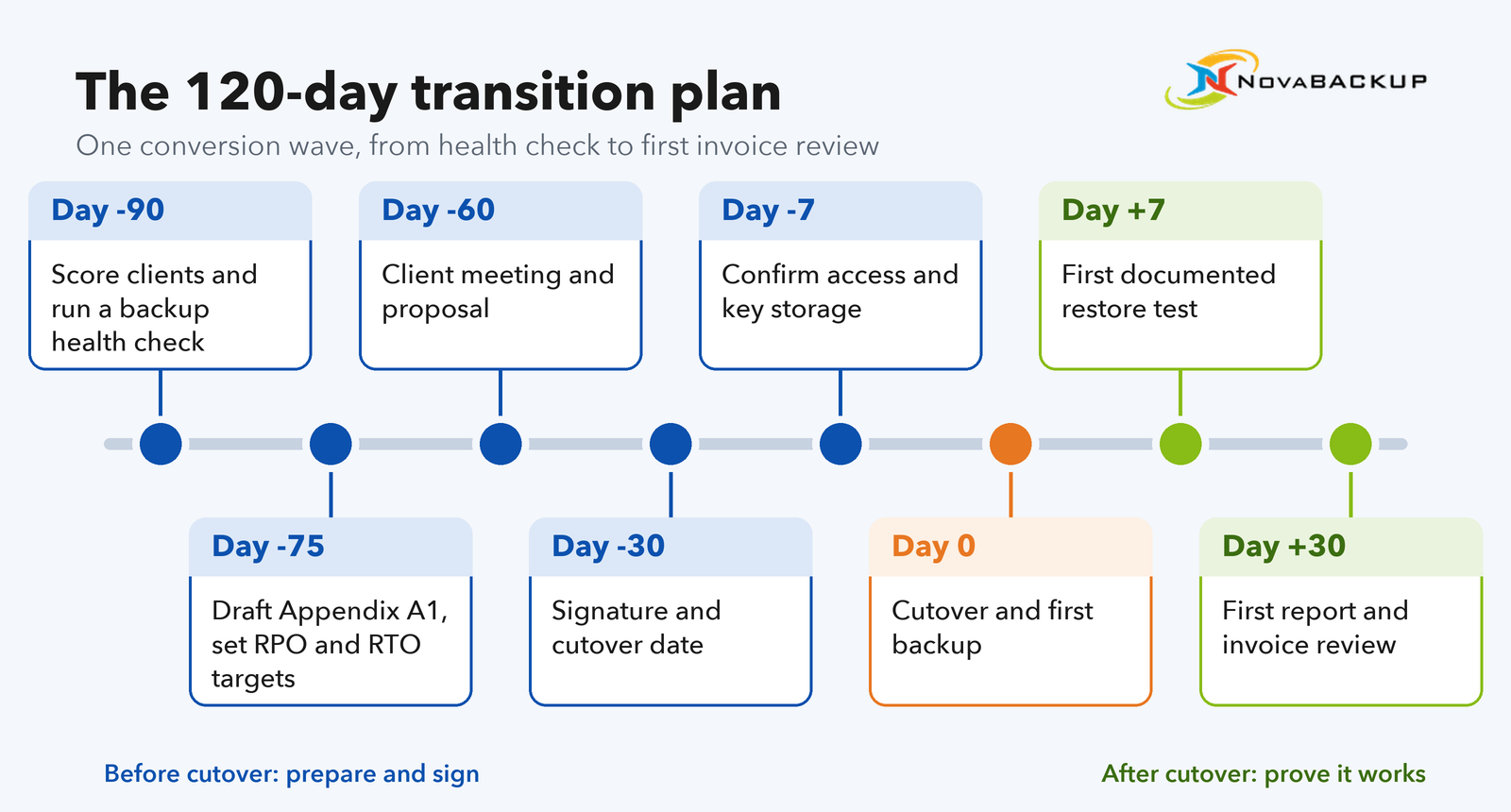
| Day | What happens | Output |
| Day -90 | Score the client base and assign waves. Run a backup health check on each client in the wave: failed or warning jobs in the last 90 days, files and folders missing from backup sets, offsite copy present, software version, last restore test. | Wave list, one-page health check per client |
| Day -75 | Fill in Appendix A1 (protected systems) for each client from the health check. Set RPO and RTO targets per workload. | Draft Schedule A per client |
| Day -60 | Client meeting. Walk through the health check findings first, then what changes under the service: monitoring, monthly restore tests, monthly reports, defined restore times. Price comes last. Send the proposal, MSA, Schedule A, and DPA or BAA where required. | Signed proposal target: Day -30 |
| Day -30 | Signature. Schedule the cutover date to match the license expiry. Turn off auto-renewal on the old license so it doesn't renew before cutover. Send the client notification email (template below). | Signed agreement, cutover date |
| Day -7 | Confirm admin access, storage targets, and encryption key storage. Create the client's account in your backup console. | Cutover checklist complete |
| Day 0 | Cutover. Connect or install agents, apply your standard configuration template, run the first full backup to local and cloud targets. Confirm the local copy completes. The first cloud upload can take several days on an office connection, so track it until it finishes. If you bill devices in advance, send the first device invoice now, prorated to the end of the month. | First successful backup |
| Day +7 | First documented restore test: one file-level restore per system and one full restore of the most critical server. | Restore test log entry |
| Day +30 | First monthly report and first storage invoice, or the first full invoice if you bill everything in arrears. Internal review: time spent per client, billing accuracy, anything the agreement didn't cover. | Report, invoice, process changes for the next wave |
The health check at Day -90 does double duty. It gives you Appendix A1, and it gives the client a concrete reason to switch. A list of three failed jobs and one unprotected folder carries more weight in the meeting than any explanation of managed services.
Keep old backup data readable during the retention overlap
At cutover, the new backup sets start with zero history. If the client needs a file from three weeks ago on Day +5, it's only in the old backup sets.
Don't delete or overwrite old backup sets at cutover. Keep them readable until your new retention period covers the same window. With 30 days of local retention, that's Day +30. With 90 days of cloud retention, it's Day +90.
Document where the old data lives and how to restore from it in the client's file, so anyone on your team can handle a restore request during the overlap.
If the old data sits on a different vendor's product, keep one working install or restore tool available for that format until the overlap ends, then decommission it and record the deletion.
If the client stays on the same platform, the old backups may remain usable after the agent connects to central management. Verify that with a test restore from a pre-cutover backup before Day +7.
Client notification email template
Send this after signature and before cutover to welcome your client to the new service and proactively answer any questions they might have.
Client notification email
Subject: Your backup service starts on [date]
Hi [Name],
Thanks for signing up for our managed backup service. Here's what happens next.
On [cutover date], we'll switch your backups to the managed service. Your current backups stay available until [date], so nothing you've backed up so far is lost. You won't need to do anything, and your team can keep working as usual.
What changes for you:
- We monitor your backups every business day and fix failed jobs before they become a problem.
- We test restores every month and send you a one-page report with the results.
- Your license renewal invoice is replaced by a monthly invoice. The first one arrives on [date].
What we need from you: let us know before you add a new computer, server, or software, or move important files to a new location. If it's not in your backup plan, we can't restore it.
To request a restore, contact [name/phone/email]. Have the file or system name and the date you need ready.
Best regards, [Your name]
Example: Converting NovaBACKUP License Clients to Managed Backup
The process above works with any backup platform built for MSPs. If your clients already run NovaBACKUP PC Agent or Server Agent licenses, the technical side of the conversion is simple.
What the conversion looks like
No reinstall in most cases. Existing agents connect to the NovaBACKUP central management console. Some older client versions need a local update before they connect. Once connected, later agent updates are pushed from the console.
One account per client. Each client gets its own tenant in the console, with its own agents, groups, storage, and roles. You can give clients a login limited to their own environment so they can check backup status without calling you, and give reseller partners or junior technicians access scoped to the clients they handle.
Billing data per client. The console reports usage per client, which is the source for the monthly invoice described above. APIs for the central management console and the individual agent are included at no extra cost, so you can push usage into your PSA or billing tool.
Storage options. Local backup and the central management console are part of the service. Cloud storage is hosted in the US, Germany, or Canada, or you can connect your own S3-compatible storage.
What the standard configuration includes. Hybrid jobs write local and cloud copies in one job, incremental forever keeps the backup window short after the first full backup, and backup verification checks that all selected data is included in the backup storage.
What it doesn't include. There's no credit for remaining license time. Time each conversion to the license renewal date, as described in the renewal section.
Getting started. Onboarding includes a free intro session with a NovaBACKUP technician, and no certification is required. The 30-day trial carries its configuration over when you sign, so the pilot wave can run on the trial.
From reseller to MSP: Oldham Consulting. Steve Oldham has run Oldham Consulting in Cumming, Georgia, since 1991, and resold NovaBACKUP licenses to his clients for more than a decade before switching to managed backup. He replaced separate licenses per customer with a single platform and central monitoring, and now runs local and offsite backups to multiple storage destinations for every client as standard. His clients' storage costs dropped because backups became smaller and better managed. "I find NovaBACKUP a very easy to use and efficient solution for managing data protection for our customers," he says. "It simply works. Plus, the price is fair."
Frequently Asked Questions
FAQ
How do I become an MSP if I currently resell backup licenses, and how long does it take?
Start with the clients you already have. Score them by renewal date, unbilled backup hours, backup health, regulatory exposure, stack fit, and decision path. Convert two or three as a pilot at their next renewal, then expand in waves. One wave takes about 120 days from scoring to the first invoice review. Because conversions follow license renewal dates, converting a full client base typically takes 12 to 18 months: the pilot wave, then one full renewal cycle.
FAQ
What should a managed services agreement for backup include, and is there an MSP contract template I can use?
At minimum: scope of service, a protected systems appendix, exclusions, RPO and RTO targets with conditions, client responsibilities, retention and storage location, encryption key custody, restore testing and reporting commitments, fees and billing terms, term and termination, offboarding and data return, and a liability cap. Add a data processing agreement under GDPR or a business associate agreement under HIPAA where personal or health data is involved. The clause-by-clause template in this guide covers these terms, including the backup-specific ones generic MSP contract templates leave out. Use it as a starting point and have a local lawyer review the final version.
FAQ
How do I move from break-fix to managed services without losing clients?
Don't convert everyone at once, and keep doing break-fix work while you start. Offer the managed service at a natural trigger such as an incident, a hardware refresh, or a scheduled review, and compare the client's last 12 months of backup-related invoices with a fixed monthly fee. Clients who aren't ready stay on break-fix until they are.
Start With Three Clients
The move from VAR to MSP takes four things: a scored client list, an agreement that defines what you're responsible for, a billing setup that runs from real usage data, and a pilot wave of two or three clients timed to their renewals.
Pull your renewal dates and last year's backup tickets this week. The clients at the top of that list are your first wave.
Next step
Start a free 30-day NovaBACKUP trial and run your pilot wave on it, or talk to a NovaBACKUP backup expert about converting your existing license clients.
Worth Reading
VAR to MSP: A Transition Plan, Contract Template, and Billing Switch for Managed Backup
How Much Storage Do You Need for Backups? A Sizing Formula for MSPs
Share this