
Share this
by Josefine Fouarge on Apr 16, 2026, 8:00:01 AM
The operational foundation: standardization, monitoring, and restore testing at scale
A scalable managed backup service relies on one thing that most MSPs don't invest enough in: standardization. When each client is configured differently, each client becomes a custom project, and custom projects don't scale.
One client has daily backups configured. Another has weekly. One stores their data locally, another uses cloud-only backups. Three different retention policies, two alerting thresholds set differently, and no one has tested a restore since onboarding. That is not a managed service, but a collection of individual backup arrangements that happen to share one invoice.
The first post in this series covered why the old reseller model is breaking down. Ransomware turned backup into a board-level conversation, and MSPs who can't prove recovery are losing deals to those who can. The second made the financial case for switching to a managed model, where margins, retention, and recurring revenue all move in your favor. The third blog post covered how to define your managed backup service, including a data classification exercise, Recovery Point Objective (RPO) and Recovery Time Objective (RTO) commitments, and a service tier structure.
This post covers how to run your managed backup service. Specifically, how to build a standard configuration every client deployment inherits, how to monitor across your entire client base without drowning in alerts, and how to run a managed backup restore testing schedule without it consuming your team’s week.
Table of Contents
- Standardize Before You Scale
- Multi-Client Monitoring Without Alert Fatigue
- Restore Testing: How to Make It Sustainable
- Automation That Reduces Work Without Adding Risk
- Reporting That Proves Value
- Frequently Asked Questions
- The Operational Moat
Standardize Before You Scale
A standard configuration, one that every client deployment inherits, is where a scalable managed backup service begins. Everything else, monitoring, reporting, restore testing, only works at scale if the configuration underneath it is consistent.
Without standardization, every client becomes a custom project. Custom projects create support burden, restore risk, and training problems. When a technician who didn't configure the environment has to troubleshoot a failed restore at 2am, they need to understand the setup immediately. That is only possible if the configuration follows a pattern they already know.
Which backup method to use is one of the most consequential standardization decisions. Full backups are simple but storage-intensive and too slow for regular use across many clients. Incremental backups are fast and storage-efficient but can make restores complex and unreliable if not implemented correctly. Differential backups simplify restores but create significant data redundancy.
The recommended approach for MSPs is Incremental Forever backup. Incremental Forever starts with a single full backup, then captures only changes. What makes it different from traditional incremental backup is how each subsequent increment stores file references. Every backup point contains links to all previous file versions, even files that haven’t changed. That means any restore point gives you a complete, consistent dataset without requiring you to reconstruct a chain of increments.
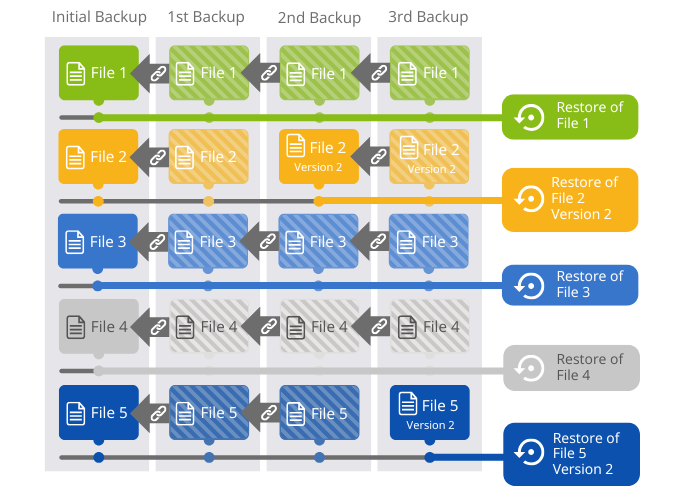
Compared to a full-plus-differential strategy with bi-weekly full backups,Incremental Forever uses roughly 83% less storage over a 30-day window on the same dataset. Across all your clients, that’s a meaningful reduction in both storage cost and backup job duration. Here's a full breakdown of how Incremental Forever backup works and why it outperforms traditional approaches.
Beyond the backup method, your standard template should cover three things.
First, encryption as a baseline for every client deployment, for data at rest and in transit. Cyber insurance carriers are increasingly requiring documented evidence of encryption. Configuring it on a per-client basis creates gaps.
Second, compression is enabled by default to reduce the storage footprint and job times for your entire client base.
Third, the retention policies are set to match the data classification framework from the third post in this series, for example, a minimum of 90 days for critical data and the regulatory minimum for business records. Here's a full guide to building a retention policy that covers both compliance and storage efficiency.
When you inherit a customer environment that doesn't fit your standard, you have to decide how quickly to move them to your template. Minor deviations are worth migrating at the next renewal conversation. Major mismatches, such as unsupported hardware or a backup product outside your stack, are worth a proactive conversation before an incident forces it.
Multi-Client Monitoring Without Alert Fatigue
There are two failure modes that can easily sneak in when monitoring your customers' backups:
- Under-monitoring, where you find out about failures when a client calls.
- Over-monitoring, where alert fatigue buries real issues in noise.
report experiencing outages directly caused by ignored or suppressed alerts.
Splunk, State of Observability 2025
To start with, logging into multiple environments just to check the backup status is a full-time job. So, managing all clients from one management console is essential.
In addition to monitoring your clients via a web dashboard, setting up proactive alerts helps you stay on top of issues as they arise. However, a poorly structured alert system causes technicians to lose trust in it. If all alerts look the same, real failures may be overlooked or buried.
Instead, organize your alerts into three tiers.
Critical alerts require immediate action: failed backup job, missed job window, restore failure, storage critically full.
Warning alerts require same-day review: storage approaching threshold, a job running significantly slower than its baseline, configuration drift detected.
Informational alerts can be reviewed weekly: successful job summaries, storage usage trends, completed retention cycles.
When a critical alert is triggered overnight, your on-call technician should create a ticket containing enough information to enable anyone on your team to take immediate action. This means that alerts should be configured to include at least the following:
- Client name
- Affected workload
- Last successful backup timestamp
- Error code and log files
- Short description of the issue
Incorporate a 15-minute weekly health review into your operational routine. Reviewing the status of the prior week across all clients can reveal configuration drift, storage trends that are heading in the wrong direction, or jobs that completed without errors but produced unusually small backup files.
Restore Testing: How to Make It Sustainable
Restore testing is the single most important operational discipline in a managed backup service. If MSPs avoid them because they're time-consuming, that's the wrong trade-off.
conduct no failover testing at all to verify their outage prevention protocols are working.
Cockroach Labs, State of Resilience 2025
For an MSP that sells recovery as a service, having untested backups is a liability. And a ransomware or other data loss incident is the worst possible moment to find out whether that untested backup holds up. This article covers the most common ways backups fail in SMB environments and how to catch them early.
We recommend performing monthly verification testing for all critical workloads. This doesn't mean that you need to perform a full system recovery for each client every month. We're talking about a structured schedule that rotates through different types of restores.
File-level spot checks verify that individual files from a recent backup can be recovered correctly. Application-specific restores, covering SQL and line-of-business applications, verify that the application can actually start and run from the restored data. Full system restores cycle through clients on a quarterly basis to verify that a complete PC or server can be brought back to a working state.
Documentation is as important as the testing itself. The record provides the support team with a baseline for normal restore times and protects you in case a recovery goes wrong and someone asks what testing was done beforehand. The log is also a client retention tool. A client who has received 12 months of documented restore test results has concrete proof that the service is working.
NovaBACKUP supports multiple approaches to restore testing that reduce the time required for each test. Backup verification runs as part of job completion. Technicians can browse and test individual files within a mounted backup without initiating a full restore. Restoring as a VHDx allows you to load a system as a Hyper-V virtual machine, eliminating the need for dedicated hardware for a full system test.
Automation That Reduces Work Without Adding Risk
saved per week by a 10-person MSP team through automated workflows.
ChannelPro Network, 2025
That’s the equivalent of hiring a part-time technician, and the extra hours allow time for onboarding a new client or conducting a quarterly business review.
Examples of rules-based tasks with predictable outcomes include job scheduling, alerting, report generation, storage cleanup, retention enforcement, and backup verification. This is in contrast to tasks that should continue to require human oversight, such as initiating restores, changing backup policies for any client, and offboarding clients.
For many MSPs, runbooks are the most practical automation investment. Similar to automation, well-built runbooks result in faster resolutions, less time spent on repetitive tasks, and fewer errors under pressure. Runbooks are documented procedures that allow junior technicians, for example, to handle routine issues consistently without escalating them. A runbook for a failed overnight backup job, for instance, should specify exactly what to check, in what order, and at what point to escalate.
If you need a starting framework, the NovaBACKUP MSP Backup Checklist covers the key operational procedures worth documenting.

Reporting That Proves Value
Clients don't see your work unless you show them exactly what you did. Without reporting, you and your service are invisible, and an invisible managed backup service is the first to get cut when a client looks for ways to reduce costs.
Regular reporting ensures your clients know what their backups are protecting against, making the service feel more relevant. Monthly reports should cover jobs run, restores tested, storage used, and incidents resolved. Since the audience is business owners, the reports should be written in plain language. One page per client is the appropriate format for most SMB clients.
Use the same reports for quarterly business reviews. Explaining how you protected a client's business last quarter is different from discussing a subscription renewal. A cheaper competitor cannot replicate the value that this product offers by simply offering a lower monthly rate.
Frequently Asked Questions
FAQ
How many backup clients can one technician manage?
With a standardized stack and a centralized management console, one technician can manage a significantly larger backup client base than without one. The ceiling depends on how much variability exists across your client base. Every custom configuration reduces that number and every client that matches your standard template increases it.
FAQ
How often should restore tests be documented?
Every restore test should be documented immediately after it runs. Record the date, the workload tested, the restore type, the result, and how long recovery took. That log is both your operational baseline and your proof of service if a client or auditor ever asks.
FAQ
What is the minimum monitoring setup for a new managed backup practice?
At minimum, you need automated alerts for failed jobs, missed job windows, and storage thresholds, all routed to a ticketing system with enough context to act without logging into the client environment. A weekly manual health review across all clients covers the gaps that automated alerts miss, such as jobs completing successfully but producing unusually small backup files.
The Operational Moat
A well-run managed backup service is difficult to replicate quickly. Standardization, monitoring workflows, restore testing cadence, and documentation all build on each other over time. A client who has received twelve months of restore test reports and quarterly reviews has a relationship with you that a competitor offering lower prices cannot establish overnight. That is the operational moat.
Our next and final post in the Managed Backup Playbook for 2026 will cover how to price a managed backup service, handle objections, and win over customers who think they are already covered.
In the meantime, would you like to see the operational workflow in action? Start a free NovaBACKUP trial and explore the multi-tenant management console firsthand, or book a call with a NovaBACKUP expert.
About This Series
This post is part of The Managed Backup Playbook for 2026, a five-part series for MSPs building or growing a managed backup service.
- Post 1: The MSP Backup Business Is Changing
- Post 2: The Business Case for Managed Backup
- Post 3: What Managed Backup Actually Looks Like in Practice
- Post 4: Building and Running Your Managed Backup Service (this post)
- Post 5: Pricing, Positioning, and Winning New Customers
Sources
- Splunk. State of Observability 2025
- Cockroach Labs. The State of Resilience 2025
- ChannelPro Network. How Can I Automate Repetitive Tasks at My MSP? 2025
Worth Reading
5 Backup Security Checks MSPs Should Run Before Attackers Do

Multi-Location Clients Need a Different Backup Plan Than Single-Site Ones | Data Protection Digest | September 2026
Share this
