
Share this
by Josefine Fouarge on Apr 7, 2026, 5:30:00 AM
How to define, package, and deliver a managed backup service MSPs can stand behind
Ask ten MSPs to describe their managed backup offering, and most will say some version of the same thing: "We monitor your backups and fix issues when they come up."
You're babysitting a product you don't own.
A defined service with documented commitments, tested recovery outcomes, and a clear scope is what separates that from real managed backup. When you build it that way, it becomes a revenue engine instead of a support burden.
The first post in this series covered how ransomware turned backup into a board-level concern, why executives started demanding proof of recovery, and what that means for MSPs who haven't adapted yet. The second made the financial case for moving from a reseller model to a managed one. This post takes the next step. Now that you have the why and the financial case, here's what the service should look like on the ground.
Table of Contents
- What Managed Backup Actually Includes
- Classify Your Client's Data Before You Promise Anything
- How to Set RPO and RTO Commitments You Can Stand Behind
- How to Build Managed Backup Service Tiers Without Overcomplicating It
- MSP-Controlled vs. Customer-Owned Infrastructure: Clarify Before You Sign
- Choosing a Platform That Supports Your Service Structure
- Frequently Asked Questions
- From Commodity to Practice: What Separates Professional MSPs
What Managed Backup Actually Includes
A managed backup service covers five things:
- Deployment and configuration on your terms
- Ongoing monitoring that catches failures before clients notice them
- Regular restore testing that verifies backups can be recovered rather than just confirming jobs ran
- Client-facing reporting that documents proof of protection
- A defined incident response process for when something goes wrong
Monitoring alone leaves you exposed. When the client's server won't come back up after a ransomware hit, "we were monitoring it" is not a reassuring sentence.
When you define managed backup this way, in writing and in your service agreement, you also close the scope creep door before it opens. "Managed" means something specific. Everything outside that scope requires an explicit conversation before anyone lifts a finger.
The service promise worth making is that you guarantee your clients' systems can be recovered, and you can prove it. That's what separates you from someone who sold a license.
Classify Your Client's Data Before You Promise Anything
One of the most expensive mistakes in managed backup is skipping the discovery step. Before you can make any meaningful recovery commitment, you need to understand what you're protecting, and that varies enormously from client to client.
Walk every new engagement through a simple data classification exercise:
This inventory does two things at once. First, it tells you how to architect the backup environment. You know what recovers first, how often, and how long it needs to be retained. Second, it surfaces compliance obligations the client may not even realize they have.
Most business records are legally required to be retained for six to ten years. Most SaaS apps are not backed up by default. Clients rarely know either of those things until you tell them. The ones who do understand why their SQL database has a different recovery profile than their file server are the ones who don't argue about scope when an incident happens.
That clarity is rarer than it should be. 62% of organizations fail to conduct regular system backups and restoration exercises (Cockroach Labs, State of Resilience 2025). Your discovery process is often the first time anyone has asked these questions seriously.
How to Set RPO and RTO Commitments You Can Stand Behind
RPO and RTO are probably the most mishandled commitments in managed backup. MSPs either overpromise because a competitor did or leave them undefined entirely and let clients assume the best case. Both are problems.
RPO (Recovery Point Objective) is how much data can be lost. If your RPO is 4 hours, the client may lose up to 4 hours of changes in a worst-case scenario. RTO (Recovery Time Objective) is how fast systems can be restored. If your RTO is 2 hours, you're committing to operational recovery within 2 hours of initiating the process.
Your architecture determines your commitments. As covered in Post 1, cloud-only recovery over a standard broadband connection can take days. That constraint needs to live in your architecture decisions before you make any promises to clients.
A practical starting point by workload type:
A note on cloud-only setups: These figures assume a hybrid local + cloud architecture for servers. If your clients rely on cloud-only backup, your committed RTOs will be significantly longer.
These are illustrative starting points. Your actual commitments depend on your stack and each client's environment. Having defined them in writing before something goes wrong is what separates a professional incident response from a chaotic one. When something fails at 2am, you want a documented plan, not a conversation about what you think you might be able to do.
If you're working through what commitments you can realistically make for your client base, we can walk through that with you. Talk to a NovaBACKUP expert.
How to Build Managed Backup Service Tiers Without Overcomplicating It
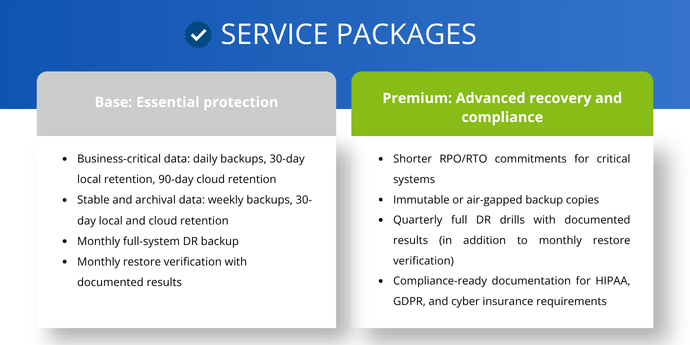
The two most common tier design mistakes are building too many (six tiers with overlapping features that paralyze clients) or too few (one flat offering that leaves revenue on the table). The right starting point is two tiers.
Base: Essential protection
- Business-critical data: daily backups, 30-day local retention, 90-day cloud retention
- Stable and archival data: weekly backups, 30-day local and cloud retention
- Monthly full-system DR backup
- Monthly restore verification with documented results
Premium: Advanced recovery and compliance
- Shorter RPO/RTO commitments for critical systems
- Immutable or air-gapped backup copies
- Quarterly full DR drills with documented results (in addition to monthly restore verification)
- Compliance-ready documentation for HIPAA, GDPR, and cyber insurance requirements
Add a third tier only when you have clients with genuinely distinct needs. Healthcare and finance are the most common cases.
When it comes to naming, skip Gold/Silver/Bronze. Those names tell clients nothing about what they're getting. Names like Protect and Recover, or Essential and Resilient, communicate outcomes, which is what you're selling.
MSP-Controlled vs. Customer-Owned Infrastructure: Clarify Before You Sign
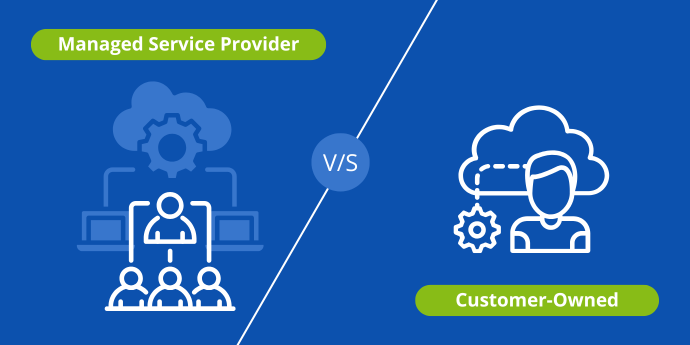
The MSP-controlled versus customer-owned infrastructure question is fundamentally about liability. In an MSP-controlled model, you standardize the stack, deploy it, and own the outcome. It's the cleaner arrangement, with less variability, more predictable margins, and easier SLA guarantees.
In a customer-owned model, you're managing their existing environment. That means higher complexity, harder-to-guarantee outcomes, and more caveats in your service agreement.
Most MSPs live in a hybrid reality, inheriting some customer infrastructure while deploying their own stack for new clients. That's fine. The key is to document clearly, before you sign anything, who owns what. That means who's responsible for the hardware, who controls the software credentials, and what happens to the data at contract end.
Something will eventually go wrong. That clarity is what protects everyone when it does. Without it, that conversation happens under the worst possible conditions.

Choosing a Platform That Supports Your Service Structure
The configuration work happens at onboarding. Each client's backup jobs are set up to match the data classification and RPO/RTO commitments you've defined. Once they're running, the platform needs to let you manage all of them without logging into 20 separate PCs remotely.
NovaBACKUP's multi-tenant management console gives you a single view across all your clients' backup jobs. For an MSP managing 20 or more clients, that's what makes the monitoring component of a managed service practical at scale. You see what's running, what's failed, and what needs attention without switching contexts.
Client-facing reporting turns the RPO/RTO commitments you made in your service agreement into documented proof. The reporting output is how you deliver that proof in a format a non-technical stakeholder can read in a quarterly business review.
Automated restore testing via backup verification backs your recovery commitments as part of your job completion logs.
If you read Post 2, you'll recognize Michael Gustine of MG Technology — a one-man MSP who projected 17–25% customer base growth without adding staff after transitioning to NovaBACKUP Managed Backup. The service structure described in this post is exactly what he built. Read the full case study.
Frequently Asked Questions
FAQ
What does a managed backup service include?
A managed backup service covers deployment and configuration, ongoing monitoring, regular restore testing, client-facing reporting, and a defined incident response process. Monitoring alone tells you whether a job ran. A managed service means you own what happens next, including whether the backup can be recovered when it counts.
FAQ
What is the difference between RPO and RTO in backup?
RPO (Recovery Point Objective) is how much data a client can afford to lose, measured as the time since the last good backup. RTO (Recovery Time Objective) is how quickly systems must be back online after a failure. Both need to be documented before an incident. Trying to establish them during a recovery is a conversation nobody wants to have.
FAQ
How do I build service tiers for managed backup?
Start with two tiers: a base tier covering essential daily backups and monthly restore verification, and a premium tier with shorter RPO/RTO commitments, immutable copies, and compliance-ready documentation. See the service tiers section above for the full breakdown. Add a third tier only when a client segment genuinely requires it.
FAQ
Why does data classification matter for backup?
Your data classification determines your recovery architecture. Without it, you can't set realistic RPO/RTO commitments, because not all data has the same recovery priority. A regulated PII database and a shared file drive do not belong in the same backup tier, and treating them the same way creates both technical risk and compliance exposure.
FAQ
How is managed backup different from just monitoring backups?
Monitoring tells you whether backup jobs ran without an error code. Managing backup means you own the outcome. You configure the environment, you test that recovery works, and you can produce documented proof when a client or auditor asks for it.
From Commodity to Practice: What Separates Professional MSPs
Your customers want to buy the confidence that their business will survive a disaster. Backup software is simply the means to deliver it. 16% of SMBs never back up their data (Viking Cloud, 2025). And they know something is missing. They're waiting for an MSP who can name it clearly and fix it.
The data classification, the RPO/RTO commitments, the service tiers, and the ownership documentation are all infrastructure for that confidence. When you define your managed backup service with this kind of clarity, you're selling a professional relationship with documented accountability. That's a different (and in a lot of cases easier) conversation than selling a subscription.
Ready to see what this looks like on a real platform? Talk to a NovaBACKUP expert and walk through how the managed model fits your service structure.
About This Series
This post is part of The Managed Backup Playbook for 2026, a five-part series for MSPs building or growing a managed backup service.
- Post 1: The MSP Backup Business Is Changing
- Post 2: The Business Case for Managed Backup
- Post 3: What Managed Backup Actually Looks Like in Practice (this post)
- Post 4: Building and Running Your Managed Backup Service
- Post 5: Pricing, Positioning, and Winning New Customers
Sources
- Cockroach Labs & Wakefield Research. (2025). The State of Resilience 2025: Confronting Outages, Downtime, and Organizational Readiness.
- VikingCloud. (2025). The 2025 SMB Threat Landscape Report: Small and Medium Businesses, Big Cybersecurity Risks.
Worth Reading
NovaBACKUP October 2026 Release: We Are Revamping How Restore Is Done
How MSPs Choose a Server Backup Option for Their Clients
Share this
