
Share this
by Josefine Fouarge on May 7, 2026, 12:00:02 PM
How to price your managed backup service, handle objections, and win clients who think they're already covered
Per-license pricing is a race to the bottom. It ties your revenue to something you actively want to minimize, and it invites direct price comparisons with any vendor your prospect can find online. What you are selling with a managed backup service is defined RPOs and RTOs, documented proof of monthly testing, and the reassurance that comes with knowing someone is watching.
This is the final post in the Managed Backup Playbook for 2026. Post 1 covered why ransomware turned backup into a board-level concern and why the old reseller model is breaking down. Post 2 made the financial case for the managed model, covering better margins, better retention, and a path to recurring revenue that license resale never offers. Post 3 defined the service itself, including data classification, RPO/RTO commitments, and service tiers. Post 4 covered the operational foundation, from standardization and monitoring, to a sustainable restore testing schedule.
This post covers how to price that service, how to communicate its value to clients who push back on cost, and how to win prospects who already think they're covered.
Table of Contents
- A Practical Pricing Framework for Managed Backup
- Handling the Objections You Will Hear
- The MSP Backup Audit Checklist: Five Questions for Every Prospect
- The Roadmap Is Complete. Now Use It.
- Frequently Asked Questions
A Practical Pricing Framework for Managed Backup
Determine your cost baseline before setting any price. That baseline includes your platform's cost per client, the time required to manage each client each month (including monitoring, testing, and reporting), and your restore testing overhead.
Layer your margin target on top of that baseline. A 50 to 70% gross margin is both achievable and appropriate for a managed backup service. If your current margins are significantly lower, the difference is likely in how you package and present the service.
A starting framework by tier:
Figures are illustrative and based on pricing discussions across the r/msp community and other vendor-neutral information (2024–2025). Your actual rates depend on your region, platform costs, labor rates, and client mix. Use these as a starting point.
One more note on server pricing: a file server and a SQL database that runs your client's billing system are not equally valuable. The SQL server requires more frequent backup jobs, application-consistent snapshots, and a verified restore that confirms the application actually starts. The complexity, the risk, and the time required are all higher. Servers that run critical databases or line-of-business applications should cost more than file or print servers. Use the classification from Post 3 to help identify which servers should be placed in the higher tier.
Include annual adjustments in every contract based on scope or overall inflation. Clients who have received 12 months of restore test reports and quarterly business reviews are not likely to leave over a 5% annual increase. However, clients who have never seen proof of your work might. This is another reason why the reporting cadence from Post 4 matters commercially.
For a deeper look at building a profitable managed backup offering, the Grow Your Business with Managed Backup Services eBook walks through the full economics of the managed model, from pricing structure to vendor selection.
Handling the Objections You Will Hear
"I can take care of the backup myself"
This objection can take different forms, for example, "Our IT person handles it." The underlying assumption is typically that managing backups in-house is cheaper than paying an MSP.
The reality is that SMBs usually don't have a dedicated IT person. Instead, it's often an employee with a knack for IT, or worse, an untrained friend, who handles it in their spare time.
either self-manage their cybersecurity or rely on friends or family members who lack the necessary expertise. 26% acknowledge that the person managing their security lacks proper training.
VikingCloud, 2025 SMB Threat Landscape Report
Help price-sensitive prospects understand the true cost of managing backups in-house by listing all the items they would have to take care of. Staff time for monitoring and troubleshooting, the cost of a failed restore during an actual incident, the absence of documentation for cyber insurance, and the liability exposure from undefined SLAs all add up quickly.
| Cost Category | DIY / In-House | Managed Backup Service |
|---|---|---|
| Software / platform cost | License fee paid, often with no multi-client management | Included in monthly service fee; MSP platform often lower per-seat than enterprise licensing |
| Staff monitoring time | Often unbilled or absorbed; 2–4 hrs/month typical for a basic setup | Covered. Tiered alerting and centralized console reduce technician time significantly |
| Restore testing | Rarely performed; no documented results | Monthly schedule with documented results; proof exists when it matters |
| Cyber insurance documentation | Usually absent; creates coverage gaps or audit failures | Built into Premium/Compliance tiers; satisfies most carrier requirements |
| Cost of failed recovery during incident | Unquantified until it happens — and often existential for an SMB when it does | Minimized by tested recovery and defined RTO commitments |
This comparison is most effective in a discovery conversation, before you've presented pricing. Frame it as a cost-visibility exercise: "Let's account for all the time your team spends on backup-related tasks each month, and what it would cost to recover without a tested restore."
"We already have backup software."
If a prospect says this, they likely do have a backup product, or a backup job that runs somewhere, or a folder on a cloud drive that someone decided counts as backup. What most of them do not have is a managed backup service with tested recovery and documented proof.
Reframe the conversation without attacking the current provider or solution. Ask them when they last tested a restore, and then explain how you handle restore testing.
cited cybersecurity as the top challenge that led them to partner with an MSP.
JumpCloud, 2024
Backup and regular restore tests are the most concrete, most provable form of cyber resilience you can offer.
"We use a major cloud provider."
When it comes to cloud providers, explain that cloud sync is not backup. If a file gets deleted or corrupted, the sync propagates the problem. Talk about what recovery actually looks like when they need yesterday's version of a file and show the difference in results between a sync service and an actual backup.
The shared responsibility model is widely misunderstood by SMB owners. Explaining it clearly and without condescension is one of the most effective things you can do in a first conversation. This blog post dives deeper into this topic.
"It's too expensive."
SMB owners push back on price. That is normal and expected. However, it's a mistake to respond to that pushback by offering a lower price. A better approach is to reframe the conversation and communicate the ROI of managed backup to those price-sensitive SMBs.
Frame it as Insurance
Most SMBs carry property insurance for buildings for which they have never filed a claim. They do so because the potential downside of not having insurance is too great. Data is no different. In fact, the risk profile is worse because buildings are not hit by ransomware as often as data.
Ask your clients how much one hour of downtime would cost their business. Let them do the math. Once business owners realize that a single ransomware incident could cost more than two years of your monthly fee, the price objection largely takes care of itself.
The average cost of a cyberattack on an SMB is $254,445 when factoring in recovery, lost productivity, and reputational damage.
Microsoft Security/Bredin, 2025
Once they realize what a ransomware attack (or a stolen laptop, a broken server, etc.) could cost them, a $300 or $500 monthly managed backup service fee stops looking like an expense and starts looking like insurance. Here is a practical guide to communicating the value of managed backup to clients who default to comparing prices.
Show Your Value
doubt their organizations are adequately prepared against cyberattacks.
Munich Re, 2024
The prospect sitting across from you is almost certainly in that majority. Your job is to show them you have a plan for it.
Ask them if their current provider can demonstrate a successful restore from last month. If the answer is no, or if the client doesn't know, then you are no longer competing with the incumbent's price. You're selling against their silence on the most important question.
And then show the prospect a restore test log and walk them through the audit questions below. Let the gaps in their current setup do the persuading.
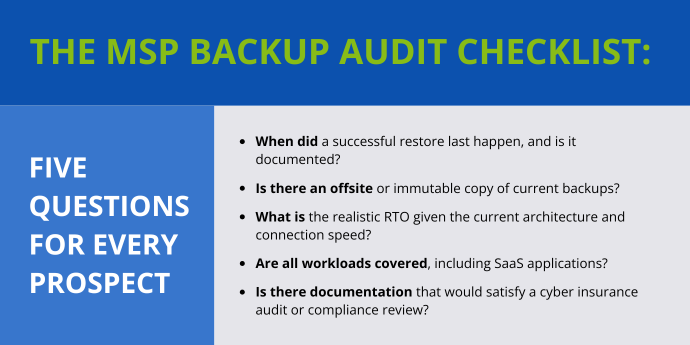
The MSP Backup Audit Checklist: Five Questions for Every Prospect
The backup audit is the most underused sales tool in the MSP toolkit, yet it addresses pretty much all of the above objections.
Helping a prospect understand their current risk exposure opens up different angles that you can then explore in more depth to confidently showcase your service.
This five-question audit is structured like a 30-minute discovery call. Each question is designed to reveal a potential gap.
Question 1: When did a successful restore last happen, and is it documented?
This is the single most disqualifying question for an incumbent provider. If the answer is "I'm not sure," or "we tested it when we set it up," the client has backup jobs running but no verification that recovery works. As covered in Post 4, the majority of organizations run no failover testing at all. A managed service with a monthly restore testing schedule and a documented log is the direct answer to this gap.
Question 2: Is there an offsite or immutable copy of current backups?
Ransomware attacks now routinely target backup infrastructure before triggering the encryption payload. Post 1 discussed this in detail. In short, compromised backups are now the rule, not the exception. However, data loss can occur in various ways, even outside of ransomware.
Backups that exist only on-premises or only in the cloud are single points of failure. A backup strategy should include both local and offsite copies to ensure quick and full access to potentially lost data. In some cases, an immutable backup — where the data cannot be overwritten or deleted for a defined retention period — is an added layer of protection.
Question 3: What is the realistic RTO given the current architecture and connection speed?
Many clients have cloud-only backup and have never calculated what recovery actually takes. Restoring 2TB from cloud storage over a standard 100 Mbps connection takes roughly 45 to 55 hours.
Walking a client through that math, using their actual data volume and their actual connection speed, is often the moment the conversation shifts. A hybrid local-plus-cloud architecture with a defined RTO commitment is the answer. That requires a managed service.
Question 4: Are all workloads covered, including SaaS applications?
Most business owners assume their Microsoft 365 or Google Workspace data is backed up because they pay for cloud services. It is not. Microsoft and Google operate on a shared responsibility model that protects their infrastructure, but not the data your client creates in it. Deleted emails, overwritten files, and corrupted SharePoint data are not recoverable from the provider. A separate third-party backup for SaaS applications is required for genuine coverage. If a prospect's current setup only covers on-premises workstations and servers, then that prospect has an entire workload category with no recovery coverage.
Question 5: Is there documentation that would satisfy a cyber insurance audit or compliance review?
Cyber insurance carriers now require documented evidence of quarterly restore testing, proof of immutable or air-gapped backup copies, and evidence of encryption for data at rest and in transit. Many clients have coverage they believe is in force but would fail a claims audit because the documentation does not exist.
In regulated industries the stakes are higher. HIPAA enforcement penalties for backup and recovery failures, for example, can exceed $1 million, as covered in Post 1. A full breakdown of what those regulations require from a backup and data protection standpoint is here.
The Roadmap Is Complete. Now Use It.
Throughout the Managed Backup Playbook, we discussed the market shift that made backup a board-level concern. We also talked about how MSPs who can demonstrate their ability to recover data will establish themselves as trusted partners in their markets, while those who cannot will continue to compete based on price.
Post 1 established why the old model is broken. Post 2 made the financial case for changing it. Post 3 gave you the service definition. Post 4 gave you the operational foundation. This post gave you the pricing framework, the audit methodology, and the sales tools to take it to market.
You have the roadmap. Now start a free NovaBACKUP trial to experience the managed backup workflow firsthand, or book a call with a NovaBACKUP expert and let's build it together.
About This Series
This post is part of The Managed Backup Playbook for 2026, a five-part series for MSPs building or growing a managed backup service.
- Post 1: The MSP Backup Business Is Changing
- Post 2: The Business Case for Managed Backup
- Post 3: What Managed Backup Actually Looks Like in Practice
- Post 4: Building and Running Your Managed Backup Service
- Post 5: Pricing, Positioning, and Winning New Customers (this post)
Frequently Asked Questions
FAQ
How much should I charge for managed backup services?
Begin by establishing your cost baseline, which includes platform cost per client, monthly management time (including monitoring, testing, reporting, and restore testing overhead). Then, layer a gross margin target of 50 to 70% on top of that. As a starting point, Base Tier pricing is approximately $75–$150 per server and $10–$25 per workstation per month. The Premium tier, which includes shorter RPO/RTO commitments, immutable copies, and compliance documentation, costs approximately $150–$300 per server per month. Actual rates depend on your region, platform costs, and client mix.
FAQ
Why do servers cost more to back up than workstations?
Backing up a file server and a SQL database that runs a client's billing system are not the same problem. Servers running critical databases or line-of-business applications require more frequent backup jobs, application-consistent snapshots, and verified restores to confirm that the application actually starts, not just that the files are present. The complexity, risk, and time required are all higher.
FAQ
How do I handle a prospect who says managed backup is too expensive?
Instead of lowering the price, reframe the conversation. Ask them how much one hour of downtime costs their business, and then let them do the math. On average, a cyberattack costs an SMB $254,445 (Microsoft Security/Bredin, 2025). Once business owners understand that risk, a $300–$500 monthly fee starts to look like insurance, not overhead. If they push back, explain the true cost of a DIY approach, including staff monitoring time, absent restore testing, missing cyber insurance documentation, and the cost of failed recovery during an actual incident.
FAQ
How do I respond to a prospect who says they already have backup?
Ask them when they last tested a restore. Most prospects with an existing backup product have jobs running, but they have no way of verifying that recovery works. That is the gap. You are not competing with the price of their current product; you are competing with their current product's silence on the most important question. Show them a restore test log and walk them through the five audit questions from this blog.
FAQ
What is the shared responsibility model, and why does it matter for MSP prospects using cloud providers?
Cloud providers like Microsoft and Google protect their infrastructure, not the data that their customers create within it. Deleted emails, overwritten files, and corrupted SharePoint data cannot be recovered from the provider. A separate third-party backup is required for genuine coverage of SaaS applications. This is a common misconception among SMB owners, and it's important to explain this clearly during the first conversation.
FAQ
How do I run a backup audit with a prospect who already thinks they're covered?
Keep it to 30 minutes and frame it as a risk exposure assessment rather than a critique of their current provider. The five questions in the audit checklist section will cover everything you need to know: when the last successful restore occurred, if there is an offsite or immutable copy, what the realistic RTO is given their architecture and connection speed, if all workloads including SaaS are covered, and if they have documentation that would satisfy a cyber insurance audit. Most prospects cannot confidently answer all five. These gaps form the basis of the conversation.
FAQ
What documentation does a client need to satisfy a cyber insurance audit?
Typically, carriers require documented evidence of quarterly restore testing, proof of immutable or air-gapped backup copies, and evidence of encryption for data at rest and in transit. Many clients have coverage that they believe is active, but they would fail a claims audit because they lack this documentation. The Premium and Compliance Add-On tiers in the pricing framework are designed to meet these requirements.
Sources
- Microsoft Security/Bredin SMB Research. 2025.
- Munich Re. Global Cyber Risk and Insurance Survey. 2024.
- JumpCloud. Key MSP Statistics and Trends to Know for 2025. 2024.
- VikingCloud. Successful Cyberattacks Would Force 1 in 5 SMBs Out of Business. 2025.
- VikingCloud. SMB Cybersecurity Survey Statistics and Threats. 2025.
Worth Reading
5 Backup Security Checks MSPs Should Run Before Attackers Do
Multi-Location Clients Need a Different Backup Plan Than Single-Site Ones | Data Protection Digest | September 2026
Share this
