
Share this
by Adam Stuflick on Sep 3, 2026, 8:00:01 AM
Over the past year, we have seen that:
- Ransomware routinely targets backup infrastructure before triggering encryption.
- Cyber insurers are becoming more specific, demanding documented proof of restoration testing rather than just checklists.
- Backup Exec has been discontinued.
- Free security updates for Windows 10 were extended to October 2027.
- Due to delays in the hardware supply chain, MSPs cannot reliably restore to matching hardware.
This blog post covers common backup and recovery questions from MSPs related to these trending topics and provides clear answers to help you optimize your small business customers' data protection strategies.
Table of Contents
- What's the difference between the 3-2-1-1-0 and 3-2-1 backup rule?
- What types of immutability are there, and how do they play into a backup strategy?
- What does a real restore test look like?
- What are cyber insurers asking for now?
- My backup vendor just got acquired or discontinued. Now what?
- With increasing hardware costs, do I still need image backups?
- With Windows 10 ESU moving to 2027, can I wait on the migration to 11?
- Does Copilot or AI in Microsoft 365 change what I need to back up?
- Should backup remain a separate line item, or be integrated into a service bundle?
1. What's the difference between the 3-2-1-1-0 and 3-2-1 backup rule?
The 3-2-1 backup rule still holds. The "1" and "0" in 3-2-1-1-0 are not a new extension. They specify what a properly implemented 3-2-1 setup should have included all along: at least one copy that cannot be modified or deleted, and proof that your restores work.
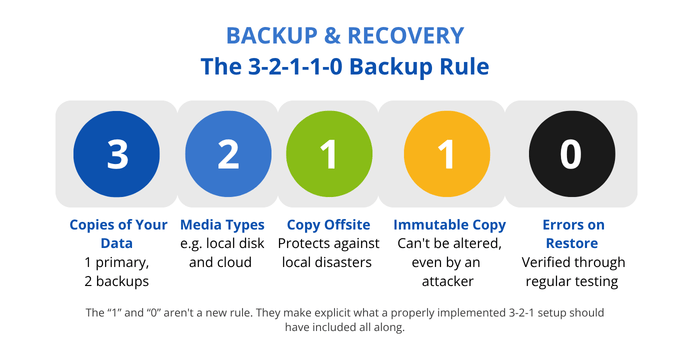
Since ransomware has become more effective at locating and eliminating backup copies before triggering encryption across the rest of the network, identifying these threats specifically has become more important.
of ransomware victims had attackers attempt to compromise their backups, and 57% of those attempts succeeded.
Sophos, 2024
A properly implemented offsite copy was never intended to be a folder that your attacker could access. The point was isolation from the start. The only thing that has changed is how aggressively that isolation is tested in a real-world scenario.
So, if your current setup cuts corners on isolation or skips restore testing, that's where it will fail, regardless of whether you call it 3-2-1 or 3-2-1-1-0. Backup jobs that combine local and cloud backups in one job can help with the simple implementation of this rule. NovaBACKUP's hybrid backup approach combines local and cloud storage in a single job, providing a practical way to satisfy the structure without managing separate backup jobs for each layer.
See our 3-2-1 backup rule guide for more on how to structure a setup across different environments. Read on for more information on the immutable piece specifically.
2. What types of immutability are there, and how do they play into a backup strategy?
Modern ransomware strains actively search for mapped drives, NAS volumes, and accessible cloud buckets to find and destroy backup copies before the main encryption process begins. The 3-2-1-1-0 strategy addresses this targeting behavior with an immutable layer. An immutable copy cannot be altered, even by an attacker with valid credentials. This is what makes it a direct answer to that specific threat rather than a general best practice.
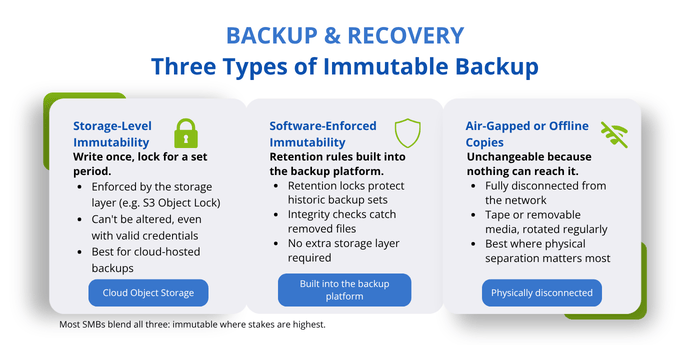
There are three ways to incorporate an immutable copy into your backup strategy, and they are not mutually exclusive.
- Storage-level immutability is the most common approach today, particularly for cloud storage. With object storage services, you can write data once and lock it for a defined period using a feature like S3 Object Lock. No one, not even an administrator or an attacker with valid credentials, can alter that copy until the retention period ends.
- Software-enforced immutability exists within the backup platform itself. Some platforms apply retention locks that protect historic backup sets from modification. NovaBACKUP combines retention settings with integrity checks. If a file is removed from a backup set, it is backed up again automatically to ensure the dataset is complete and recoverable.
- Air-gapped or offline copies aren't technically immutable in the object-lock sense, but a fully disconnected copy is unchangeable because nothing can reach it. Tape and other removable media still have a place, particularly in industries that prioritize physical separation. They require regular rotation and maintenance because physical media degrades over time.
This does not mean that every workload requires the same treatment. Immutability earns its cost in high-risk, high-value, or compliance-sensitive systems, such as the patient and billing records that a medical or dental practice handles daily. Short-lived test environments or workloads that already have strong versioned backups and no network path may not need the extra layer. Most SMBs opt for a blended approach: immutable copies for the most critical systems and standard versioned backups for everything else.
Read the full breakdown in our guide on immutable backups for SMBs.
3. What does a real restore test look like?
A real restore test involves recovering data and confirming its usability, rather than merely verifying that a backup job finished without errors. There are four types, each of which validates something different.
- Tabletop exercise: A structured walkthrough of your DR plan in which no systems are touched. You talk through a scenario, such as a ransomware event or server failure, step by step, to find gaps in your documented process before they result in any costs.
- File-level restore: As a basic check, this is the fastest way to confirm that backups are accessible and uncorrupted. Restore specific files to a staging location and verify that the content is intact.
- Application restore: Restore a specific application or database, then confirm that it launches and returns valid data. A database that restores but returns corrupted entries is a problem, and any issues may not become apparent right away.
- Full system restore: Recover the complete OS, configuration, and system state in either a staging environment or a mounted virtual machine. This is the only test that validates driver compatibility, boot behavior, and network reconfiguration under real conditions.
For critical systems, file- and application-level restores should be performed monthly or quarterly. A full system restore should occur at least annually and immediately following any significant changes, such as the addition of a new server, a software upgrade, or a storage migration.
involved backup-related errors, including corrupted backups and failed restores, contributing to unrecoverable data loss.
IDC, 2024
Document everything you do, including what was restored, how long it took compared to your RTO, who performed it, and any errors or process changes that resulted from it. This record transforms the statement "We test our backups" into something you can prove. It's evidence that both disaster recovery planning and cyber insurers expect to see.

Further reading
How to Test Your Disaster Recovery Plan
For the full testing framework, including RTO and RPO targets, restore schedules, and documentation practices.
Read the guide4. What are cyber insurers asking for now?
For most insurers, checkbox questionnaires are outdated. Instead, they require documented proof of specific controls. Cyber insurance readiness reviews in 2026 highlight three non-negotiable requirements for coverage eligibility:
- MFA
- EDR on every endpoint
- Immutable, restore-tested backups (Consilience, 2026)
Regarding backups specifically, everybody can expect one common question: "When was your last restore test, and can you show me the documentation?"
This is probably the biggest shift since last year. Insurers have transitioned from a form filled out once a year to a process more akin to a technical audit. Notice how the question directly ties back to the two answers above. Immutability and restore testing aren't beneficial for actual data recovery alone. They also support insurance claims and prove compliance with regulations, which helps avoid fines.
5. My backup vendor just got acquired or discontinued. Now what?
If your backup vendor is acquired or discontinued, your priority should be to migrate while your current setup is still working.
Unfortunately, this is not a hypothetical scenario. Backup Exec, a staple of the Windows backup community for over 30 years, was discontinued in early 2026. The end of sales occurred on March 31. While existing installations will continue to work according to their lifecycle schedule, which ends in 2029, no new licenses or renewals will be available.
This matters for two important reasons:
- Your backup data format is probably proprietary. The longer you wait to migrate, the greater the risk that historical data will become inaccessible when the old software can no longer launch on future operating systems or hardware.
- Security updates stop at the end of the software's life cycle, creating a compliance exposure in regulated industries where audits require that your backup chain stay under active maintenance.
For the full Backup Exec timeline and replacement checklist, see our post on Backup Exec's end of life.
"NovaBACKUP does exactly what I need, and I love them. Their support is great, they're always available, and it's local."
If you're interested in hearing about Tony Linton's experience finding a new backup solution after his previous one was discontinued, read the full TLC Netcon case study.
6. With increasing hardware costs, I probably won't switch hardware anytime soon. Do I still need image backups?
Yes, and if anything, image backups matter more now.
First, hardware fails eventually. Servers are typically built for a three- to five-year refresh cycle (ServerMonkey, 2026), and the components inside, especially the hard drives, tend to fail well before the entire unit is replaced. Delaying a planned hardware refresh due to cost doesn't extend the timeline indefinitely. It merely increases the likelihood that replacement will be necessary at an inconvenient time. The premise of the question, "I probably won't switch hardware anytime soon," may not be a choice you get to make.
And when hardware fails, you often don't receive an identical replacement. Semiconductor lead times reached 40 weeks in March 2026 (Accuris, 2026), and server shipment growth forecasts were reduced as a result (The Register/TrendForce, 2026). When a server fails, MSPs increasingly fill the gap with refurbished units, a different vendor's model, or whatever happens to be in stock. Exact replacements are increasingly hard to find.
This underscores the importance of including recovery onto different hardware in a restore test to ensure the system and all its applications boot properly.

Further reading
Why You Shouldn't Skip a Full System Restore Test to Different Hardware
See the full test plan to understand why recovery onto different hardware is a step you can't afford to skip.
Read the guide7. With Windows 10 ESU moving to 2027, I can wait with the migration to 11, right?
Although you have more time to upgrade from Windows 10 to Windows 11 than you did a year ago, that doesn't mean you should wait until the last minute.
Microsoft extended their Extended Security Updates (ESU) for Windows 10 from October 2026 to October 2027 without much fanfare (The Register, 2026). Businesses can sign up for the additional year of patches at any time before the new cutoff date. With hundreds of millions of PCs still running Windows 10 and upgrades being costly and complicated, especially with the rising prices of new PCs due to the AI-driven RAM and storage crunch, the extension provides much-needed breathing room.
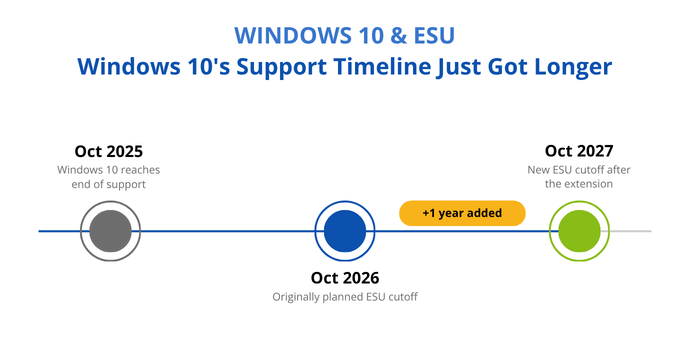
But ESU only covers security patches. It doesn't restore Microsoft's technical support or solve compliance issues for clients in regulated industries. Running unsupported software, even with security patches, can raise questions during an audit or cyber insurance renewal. And if a client's hardware doesn't meet Windows 11's TPM 2.0 and Secure Boot requirements, the extra year doesn't eliminate the eventual need for new hardware, and prices are not likely to go down anytime soon.
Quick tip: If the blocker is the cost of hardware rather than the migration itself, consider refurbished, off-lease equipment.
No matter what you decide, treat the migration like any other change. Back up your computer before making any changes and run a restore test immediately after the backup is completed. This will ensure that you can revert to Windows 10 if Windows 11 causes any issues.
For the full migration checklist, see our guide on preparing for the end of support for Windows 10.
8. Does Copilot or AI in Microsoft 365 change what I need to back up?
Copilot doesn't introduce a new category of data to protect. It alters the amount and speed of data creation. Copilot enables you to create, summarize, and rewrite content faster than you can type it out by hand.
In practice, backing up M365 now means backing up a larger and more central set of data than a year ago. Microsoft's native tools, such as version history, retention policies, and recycle bins, are not designed to create backups that can be recovered independently. These tools do not protect against ransomware or Copilot-assisted edits that overwrite important data. Since the shared responsibility model hasn't changed, Microsoft's Services Agreement recommends using a third-party solution to fill in the gaps.
Solutions like the Microsoft 365 Backup and Archive add-on from NovaBACKUP are built for automated backups of Email, Calendar, Contacts, Tasks, SharePoint, OneDrive, Groups, and Teams. They offer granular restore capabilities down to the level of a single file, folder, or message. They also provide retention and compliance features, such as audit logs, compliance tags, and eDiscovery, for clients who need to demonstrate where their data has been stored.
9. Should backup remain a separate line item, or should it be integrated into a service bundle?
Backup belongs in a service bundle. Besides the fact that backup is the only service in your stack that can prevent total data loss, one of the main reasons to include it is that it simplifies the sales process. When backup is itemized, you have to justify every line item, including the cloud storage tied to the job. You also have to defend the price against whatever the customer found shopping separately. When backup is part of a bundle, you're selling a service outcome, the ability to recover their business, rather than a stack of costs they have to evaluate individually.
Service
Industry surveys asking MSPs which services should be non-negotiable put backup at or near the top.
ChannelE2E, 2024; MSPGlobal, 2025
Bundling backup software into your monthly service also lets you limit the number of platforms your team supports. Your techs can become experts in one or two tools instead of being spread thin across ten. Bundling also lets you take ownership of the outcome since you control the infrastructure from start to finish and know exactly where to look when something breaks.
How NovaBACKUP can help
How Can NovaBACKUP Help?
NovaBACKUP handles local and cloud backups for Windows PCs, Windows Server, Hyper-V, and SQL Server, with immutable and hybrid storage options and one dashboard for managing every backup job in a single spot.
Contact us and let's talk about how we can help you with your managed backup service.
Sources
- Sophos. The Impact of Compromised Backups on Ransomware Outcomes. 2024
- Sophos. State of Ransomware 2025
- IDC. The State of Disaster Recovery and Cyber-Recovery. 2024
- The Register, citing TrendForce. AI now gobbling up power and management chips for servers. April 2026
- Accuris. The Slow Burn Becomes a Flash Point. 2026
- The Register. Microsoft extends Extended Updates for Windows 10. June 2026
- Microsoft Services Agreement
- Consilien. Cyber Insurance Requirements: 2026 Readiness Checklist. 2026
- ChannelE2E. 2024 Top Vertical Market MSPs. 2024
- MSPGlobal. State of the Industry Report, Q2 2025
- ServerMonkey. When to Replace a Business Server: 5 Signs It's Time. 2026
Worth Reading
5 Backup Security Checks MSPs Should Run Before Attackers Do

Multi-Location Clients Need a Different Backup Plan Than Single-Site Ones | Data Protection Digest | September 2026
Share this