
Share this
by Josefine Fouarge on Aug 27, 2026, 8:00:04 AM

Table of Contents
- What to Look for in Cloud Storage for Server Backup
- Why Fewer Alerts Isn't the Same as Better Security
- Incremental Forever: The Business and Technical Case
- 7 Things MSPs Should Look for in a Managed Backup Platform in 2026
What to Look for in Cloud Storage for Server Backup
Every year, more server backups are being stored in the cloud. According to our own data, cloud storage usage for backups increased by 91.6% within 2 years. And why not? Offsite protection, storage that grows as data grows, and access from anywhere are solid benefits of using cloud storage for backups.
The actual question is not whether to use cloud storage for server backups (that question is answered here), but which option to use and what it can and cannot do as part of a backup plan. Not all "clouds" are the same product, and the storage you choose affects the restore process as much as the backup software.
Our blog post covers three cloud options, what to check before committing to one, and when the cloud is no longer enough.
Social Media Post of the Month

You might understand per-GB pricing. But it might not make sense to small business owners trying to decipher their invoice. In his latest LinkedIn post, Mike delves into the trade-off between per-endpoint and per-GB billing for managed backup. He explains that the "right" model depends less on what's easiest to explain and more on the risks you're willing to take on.
Take a look at our LinkedIn post to learn more →
WEBINAR
Partner Update Webinar Recording
If you'd like to sign up for the beta version we introduced during the webinar, please send an email to beta@novabackup.com.
The World of Data Protection
Why Fewer Alerts Isn't the Same as Better Security
A recent research study on "The State of SecOps" found that, on average, security teams face thousands of alerts per day, which is far more than any team could realistically triage. Only 37% of these alerts are detected and investigated.
The study argues that reducing the volume of alerts without providing context increases the odds that important alerts will be missed, and that every alert will have to be investigated from scratch.
In another ChannelE2E article, Blumira's CEO makes the broader point that, as you take on more clients without growing your staff at the same pace, the most helpful tools are the ones that provide your technicians with a clear next step.
The "raw signal versus real answer" problem applies to backup monitoring the same way, a topic Nate recently addressed in a LinkedIn post. He lays out a four-point filter system for reviewing client backups in under ten minutes a day. This system allows users to catch jobs that never ran, spot warning patterns instead of one-off noise, watch for backup sizes that drift from history, and keep an eye on storage health separate from the jobs themselves.
Incremental Forever: The Business and Technical Case
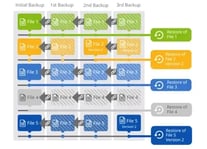
Incremental Forever has an unfortunate name because it is very different from traditional incremental backups. This month, Mike and Nate each tackled Incremental Forever backup from a different angle, and together, they present a compelling case for why it should be your default backup strategy.
Mike breaks down the cost side. In a typical SMB setup, Incremental Forever can reduce cloud storage needs by about 70% compared to a full-plus-differential rotation. It also provides shorter backup windows and simpler retention management.
Nate follows up with the technical reason why this is effective. Each increment is a complete, independently restorable snapshot. Therefore, a single corrupted or deleted backup file won't render your entire backup useless.
7 Things MSPs Should Look for in a Managed Backup Platform in 2026
Selecting a managed backup platform involves more than just storage tiers and pricing. This guide outlines seven evaluation criteria that MSPs should use to distinguish reliable platforms from unreliable ones. These criteria include centralized management that scales, hybrid backup architecture, proof of recovery, ransomware resilience through immutability, Windows-focused coverage, vendor-agnostic storage, and support that understands multi-tenant workflows.
See NovaBACKUP Managed Backup in Action
Spend 15 minutes with us to get an overview of NovaBACKUP Managed Backup, a fast and reliable endpoint backup solution with simple pricing and local support.
Worth Reading
NovaBACKUP October 2026 Release: We Are Revamping How Restore Is Done
How MSPs Choose a Server Backup Option for Their Clients
Share this