
Share this
by Josefine Fouarge on Apr 9, 2026, 8:00:00 AM
The 3-2-1 backup rule means keeping three copies of your data, on two different types of media, with one copy stored offsite. It's a widely recommended baseline for small business data protection, endorsed by CISA as a practical defense against ransomware and hardware failure.
A ransomware attack hits on a Wednesday afternoon. Files are encrypted, systems are locked, and your team is at a standstill. You call your IT contact and ask the one question that determines everything: do we have a clean backup we can restore from? For many businesses, the honest answer is probably that they are not sure.
Even organizations that run regular backups can still be caught off guard during an actual incident, such as a ransomware attack, human error, or hardware failure. Their backup strategy had gaps that only became visible when it was too late. The 3-2-1 backup rule exists to close those gaps before they cost you.
This guide breaks down what the rule actually requires, how to set it up for a real business environment, and how to verify it'll hold up when you need it.
Table of Contents
- Why the 3-2-1 Backup Rule Is Still the Standard
- What Counts as Offsite Backup (and What Doesn't)
- How to Implement the 3-2-1 Backup Rule: 5 Real-World Scenarios
- How to Test and Verify Your Backups Are Actually Working
- 3-2-1 Backup Rule Audit: Is Your Small Business Setup Ready?
- Common Questions About the 3-2-1 Backup Rule
- Conclusion
Why the 3-2-1 Backup Rule Is Still the Standard
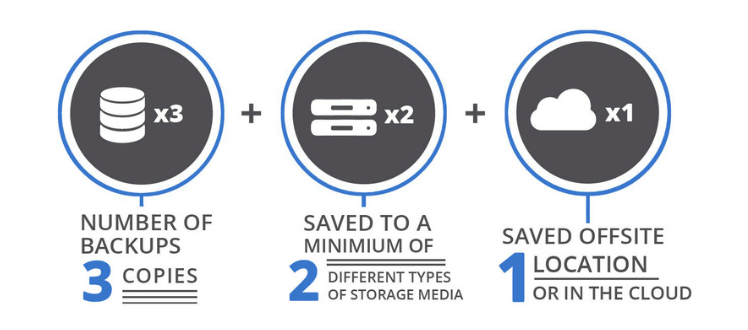
The 3-2-1 rule is the most widely adopted backup standard because it eliminates single points of failure. The formula is straightforward:
- 3 copies of your data
- Stored on 2 different types of media
- With 1 copy kept offsite
Why it works

Losing one to hardware failure, theft, or ransomware still leaves you with two others.
Prevents a single technology failure from wiping out all copies at once.
Ensures a physical event — fire, flood, or break-in — can't take out your entire backup set.
That last point has become more critical in recent years. Ransomware attacks now routinely target backup files before triggering encryption across the rest of the network. Sophos found that 94% of ransomware victims had attackers attempt to compromise their backups (Sophos, 2024), and 57% of those attempts succeeded (Sophos, 2025).
A backup sitting on the same network as your production data is just as reachable to an attacker as everything else. The 3-2-1 rule addresses this directly. Keeping copies isolated across locations and media types means a single compromise can't take out everything.
The rule is also endorsed by CISA, the U.S. Cybersecurity and Infrastructure Security Agency, as a baseline recommendation for all organizations protecting against ransomware.
But no matter the reason for data loss, the average cost of downtime for SMBs with fewer than 200 employees runs $100,000 per hour (ITIC, 2024). Compared to that, the cost of implementing the 3-2-1 rule is negligible.
What Counts as Offsite Backup (and What Doesn't)
For an offsite backup to satisfy the 3-2-1 rule, it needs to be in a physically separate location, isolated from the network your primary data is on, and independently recoverable even if your main office and systems are completely unavailable.
A second hard drive plugged into the same computer doesn't qualify. A NAS device sitting in the same office doesn't qualify. Neither does a cloud folder that syncs directly to your production files in real time. A legitimate offsite copy meets these three criteria:
- Physically separate: A different building, data center, or cloud storage environment entirely.
- Network-isolated: Not directly reachable from the same network that an attacker could already be on.
- Independently recoverable: You can restore from it even if your primary office and systems are completely unavailable.
Cloud backup is the most practical way for most businesses to satisfy this requirement.
The important distinction is backup. A sync mirrors your current files, which means if a file gets encrypted or corrupted, that change syncs immediately. A proper cloud backup maintains versioned, point-in-time copies, so you can restore to a clean state from before an incident occurred.
A Note on the 3-2-1-1-0 Rule
You may have seen vendors promoting the 3-2-1-1-0 rule as the modern upgrade to 3-2-1. The extra numbers stand for one immutable or air-gapped copy, and zero errors on verified restores. Both are worth doing, but then, they were always worth doing.
A properly implemented offsite copy has never meant "a folder your attacker can also reach." Isolation was the point from the start. What has changed is ransomware's ability to actively hunt for and destroy backup copies before triggering encryption. That's a serious threat and immutability is a real answer to it. An immutable backup copy can't be modified or deleted within its retention window, even by an account that's been compromised.
This means that the 3-2-1 rule still applies. Implementations that cut corners on isolation or skip restore testing are the ones that fail.
For a closer look at how immutable backups work and whether your setup needs them, check out our guide here.
How to Implement the 3-2-1 Backup Rule: 5 Real-World Scenarios
The right setup depends on your business size, infrastructure, and compliance requirements. Here are five configurations you can use as a starting point.
Scenario 1: Small business server backup (5–20 employees)
Local backup to an internal drive or NAS device, a second copy to an external drive rotated offsite weekly, and a nightly cloud backup job. The cloud copy handles the offsite requirement reliably without depending on staff remembering to rotate physical media consistently. Put the rotation schedule in writing as formal policy.
NovaBACKUP combines local and cloud backups into a single job, simplifying ongoing maintenance. It also provides automated alerts when a job fails or runs outside its scheduled timeframe. Learn more about small business server backup software.
Scenario 2: Managed backup for SMBs with compliance requirements
Industries like healthcare, legal, and financial services carry specific data retention and protection requirements. HIPAA, for example, requires documented retention periods, encryption at rest and in transit, and in some cases geographic restrictions on where data can be stored. Your cloud backup provider needs to meet those requirements, and your backup agreement should include a Business Associate Agreement (BAA) where required.
The 3-2-1 structure still applies as compliance governs the specifications of each copy. For regulated industries, maintaining verified, recoverable backups is a legal requirement, and failure to demonstrate it during an audit carries real penalties.
NovaBACKUP supports encrypted backups at rest and in transit and works with local cloud providers and can provide a BAA if needed. Find out more about backup for regulated industries.
Scenario 3: Backup strategy for remote and hybrid teams
When staff are working from multiple locations, backup coverage can get inconsistent. Devices outside the office network are often missed entirely. The most reliable solution is deploying endpoint backup software on every device regardless of location, feeding into a central cloud backup account. On-site backups can still run for server infrastructure. The key is making sure remote devices aren't treated as exceptions.
Deploying endpoint backup through NovaBACKUP covers both remote and onsite devices. All devices are managed via a central dashboard, so laptops and home workstations are included in the same backup policy as the office server. Learn more about endpoint protection.
Scenario 4: Small business VM backup for virtualized environments
If your business runs virtual machines (VMs), a virtual machine backup requires software that can capture them properly. This means taking point-in-time snapshots of each VM, as well as the ability to recover a VM in an instant, making it available on the same host or in a different location.
NovaBACKUP offers an agentless backup option for Hyper-V hosts, regardless of how many virtual machines are running on them. Centralized alerting catches failed jobs before they create unnoticed gaps. Learn more about VM backup for small businesses.
Scenario 5: Micro-business backup with full 3-2-1 coverage at low cost
Small doesn't mean low risk. A single workstation running client data, financial records, or project files needs the same 3-2-1 coverage as a larger environment. Local backup to an external drive plus a cloud backup service satisfies the rule at a low cost. Getting the discipline right is the harder part. Automate everything you can, and document what you can't.
NovaBACKUP's local-plus-cloud approach covers the full 3-2-1 structure for a small workstation setup without requiring a dedicated server or complex configuration. Learn more about how to back up your PC.
How to Test and Verify Your Backups Are Actually Working
A backup that's never been tested isn't actually a backup. The most common moment businesses discover a broken or incomplete backup is during an actual incident, when time is limited and options are few.
Verification comes down to two things: ongoing monitoring and scheduled restore testing.
Monitoring means knowing when a backup job fails or runs late, without having to check manually. Your backup platform should alert you automatically when something goes wrong. A failed job that sits unnoticed for two weeks creates exactly the kind of gap a ransomware attack can exploit.
Restore testing should happen on a scheduled basis, at minimum quarterly for your most critical data. A restore test means actually recovering data to a test environment and confirming it's complete and usable. Confirming a backup job completed is only the first step. You also need to verify the data is recoverable.
When you run a restore test, verify three things:
- Can you recover individual files, not just full system images?
- How long does recovery take? Does it fit within your Recovery Time Objective (RTO)? That's the maximum time your business can afford to be offline.
- Is the recovered data current enough? Does it fall within your Recovery Point Objective (RPO)? That's the maximum amount of data loss your business can tolerate, measured in time.
Document every test, including failures. A failed restore test found during a scheduled check is a fixable problem. Found during an incident, it becomes a crisis.
For a full breakdown of how to build a ransomware-resilient backup strategy, see our blog on how to protect your business backups from ransomware.
3-2-1 Backup Rule Audit: Is Your Small Business Setup Ready?
Use this checklist to audit your current setup. If you answer "no" to any item, that's where to focus next.

| # | Checkpoint | Status |
Ready to close any of these gaps? NovaBACKUP combines centralized backup monitoring, automated alerts, and support for the full 3-2-1 structure across servers, workstations, and VMs. Find the right backup solution for you.
<
Common Questions About the 3-2-1 Backup Rule
FAQ
How much does it cost to implement a full 3-2-1 backup setup for a small business?
Costs vary based on how many devices you are protecting and how much data needs backing up. Local storage is typically a one-time hardware cost, while cloud backup runs as a recurring monthly fee tied to storage volume. Most small businesses spend far less on a proper 3-2-1 setup than a single hour of downtime costs during an outage. NovaBACKUP's pricing page breaks down current plans by business size.
FAQ
How long should each backup copy in a 3-2-1 setup be retained?
Retention needs depend on your industry and how far back you might need to restore from. A common baseline is 30 days of daily versions plus several months of weekly snapshots for general business use. Regulated industries like healthcare or finance often require longer retention to meet compliance rules. Confirm your specific compliance requirements before finalizing a retention schedule, since some industries mandate multi-year windows. Our HIPAA-verified backup guide covers what regulated retention looks like in practice.
FAQ
Who should be responsible for managing a 3-2-1 backup setup at a small business without dedicated IT staff?
Someone at the business needs clear ownership of monitoring alerts and running quarterly restore tests, even without a formal IT department. This is often the office manager or owner, since automated backup software handles the daily execution. Businesses that want this fully handled can outsource it entirely to a managed service provider. NovaBACKUP's managed backup service explains how that handoff typically works.
Conclusion
Three copies. Two media types. One offsite. The rule is intentionally simple to help you bridge the gap between merely having a backup tool and having a backup strategy that can help you survive an incident. The best place to start is by auditing your current 3-2-1 backup strategy. Most of the gaps you might have can likely be closed without significant cost or complexity.
Ready to see how NovaBACKUP handles a 3-2-1 implementation for your business? Start a free trial and explore the platform firsthand.
Sources
- CISA. Back Up Business Data
- Sophos. The Impact of Compromised Backups on Ransomware Outcomes. 2024
- Sophos. State of Ransomware 2025
- ITIC. 2024 Hourly Cost of Downtime Report. 2024
Worth Reading
5 Backup Security Checks MSPs Should Run Before Attackers Do
Multi-Location Clients Need a Different Backup Plan Than Single-Site Ones | Data Protection Digest | September 2026
Share this
