
Share this
by Nathan.Fouarge on Oct 22, 2026, 10:00:04 AM
The October release of NovaBACKUP introduces a new system backup feature and a redesigned local agent UI. System backups are now file-based and part of the regular local, cloud, or hybrid backup job, managed in the local client or from the central management. Full systems can be restored directly to a Hyper-V VM or recovered to the same or new hardware straight from a cloud backup. Restores started on the agent run over multiple streams. Additionally, the NovaBACKUP agent has been completely redesigned with an API-first architecture.
For more information, check out:
Table of Contents
- System Backup and Restore
- The Redesigned NovaBACKUP Agent
- Bug Fixes and Improvements
- Frequently Asked Questions
- What's Next
NEW
System Backup and Restore
System backups are moving into the regular backup job, combining regular file and system backups into one tab. Along with this change, we are upgrading from image-based to file-based system backups. This upgrade enables a range of new options that improve the reliability of system backups and restores.
You can now create and manage system backups from either the local client or the central management, and the backup files can be stored in any connected local or cloud storage.
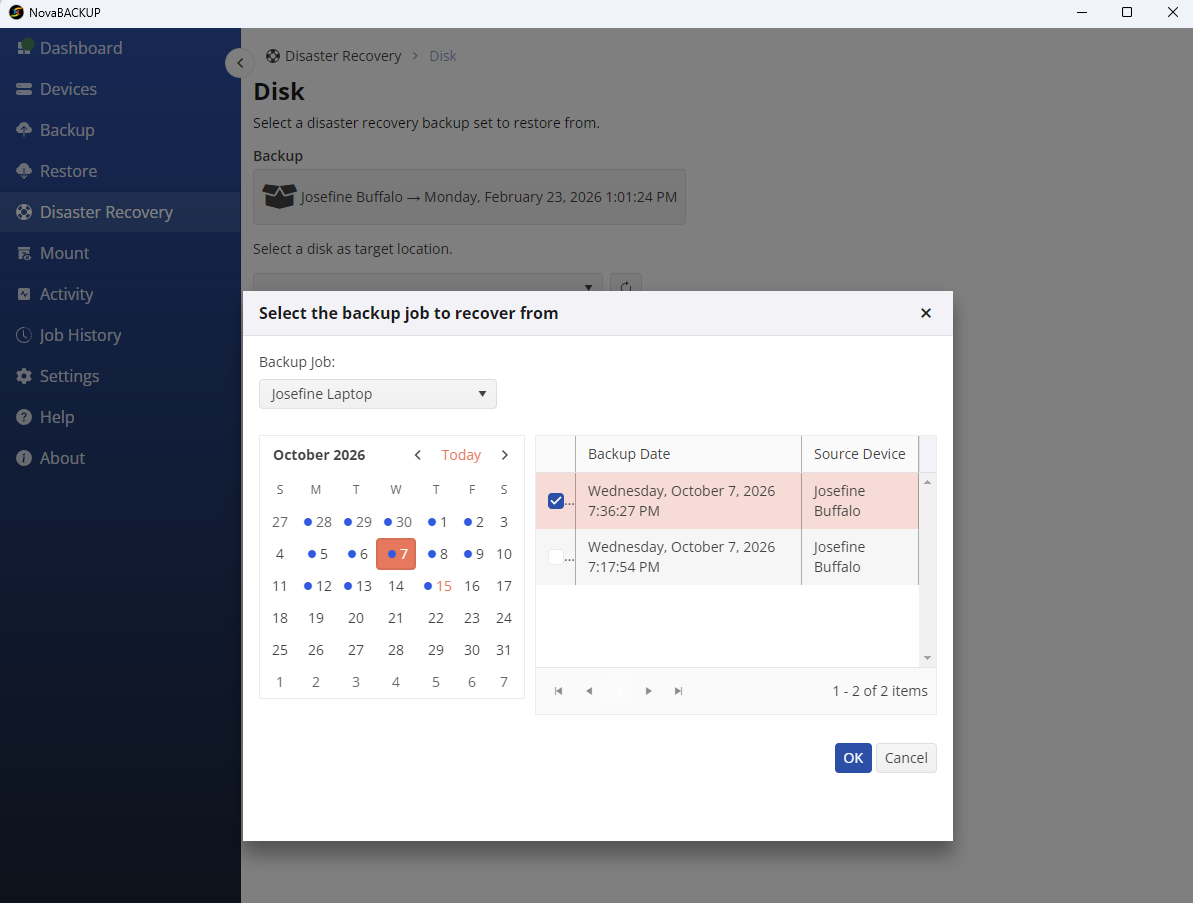
System restores are still available for the same and new hardware and now include the option to boot the backup as a Hyper-V VM.
File-Based System Backups
System backups are now file-based and use the incremental forever backup scheme. Our regular file backups have already been able to take advantage of the improvements that it brings, including:
- Each run checks which files have changed and backs up only those changes. This results in shorter backup windows and reduced use of local and cloud storage without changing your retention settings.
- Each backup increment contains all the necessary information to restore the system, so a damaged file won't take the rest of the backup down with it.
- Recoverability verification checks system backups before each run and backs up anything that is missing on the backup storage.
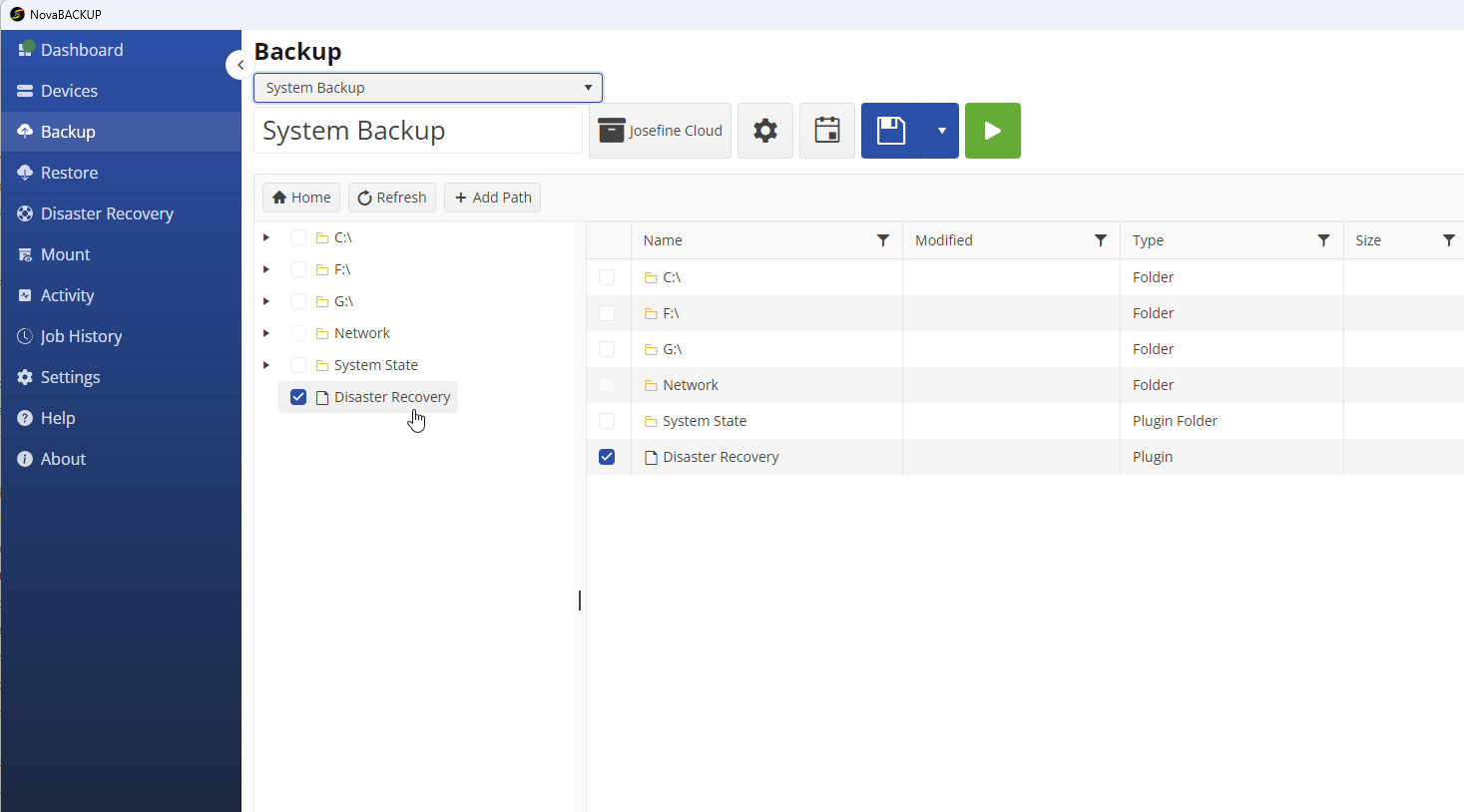
To get started, select "Disaster Recovery" in the "Backup" tab of a backup job. The job will include everything required to recover the machine, including drivers, settings, partitions, and boot configuration, regardless of the exclusions set for the rest of the job.
Set Up and Monitor From the Central Management
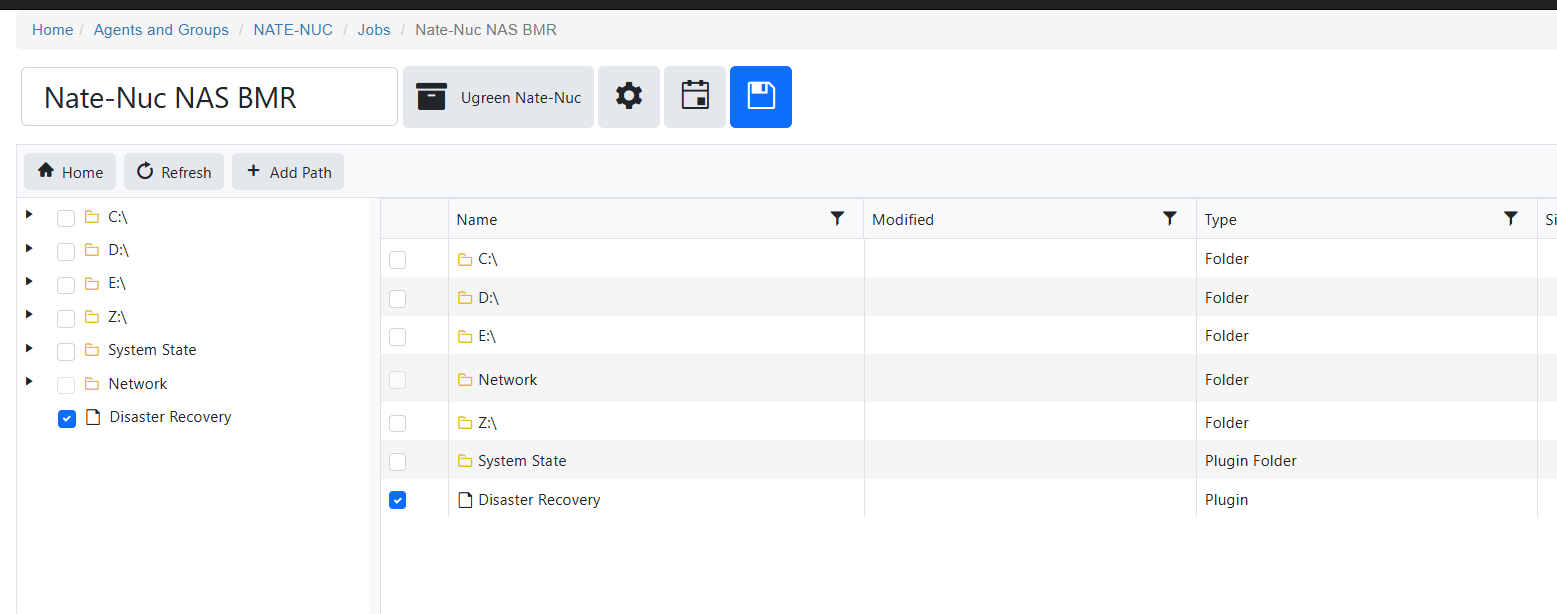
Until now, image backups could only be configured on the local client. Going forward, the Disaster Recovery option is available in both the central management of NovaBACKUP Managed Backup and the local client. This allows you to set up, schedule, and monitor your and your customers' system backups alongside every other backup job in the same console.
System Restore Directly to a Hyper-V VM
When a server is down, it's crucial to be able to adjust the restore process to the current situation. Sometimes, this requires restoring to different hardware because the original server is no longer functional. Other times, a quick interim solution is necessary to keep the business running while you figure out what went wrong and recreate the system.
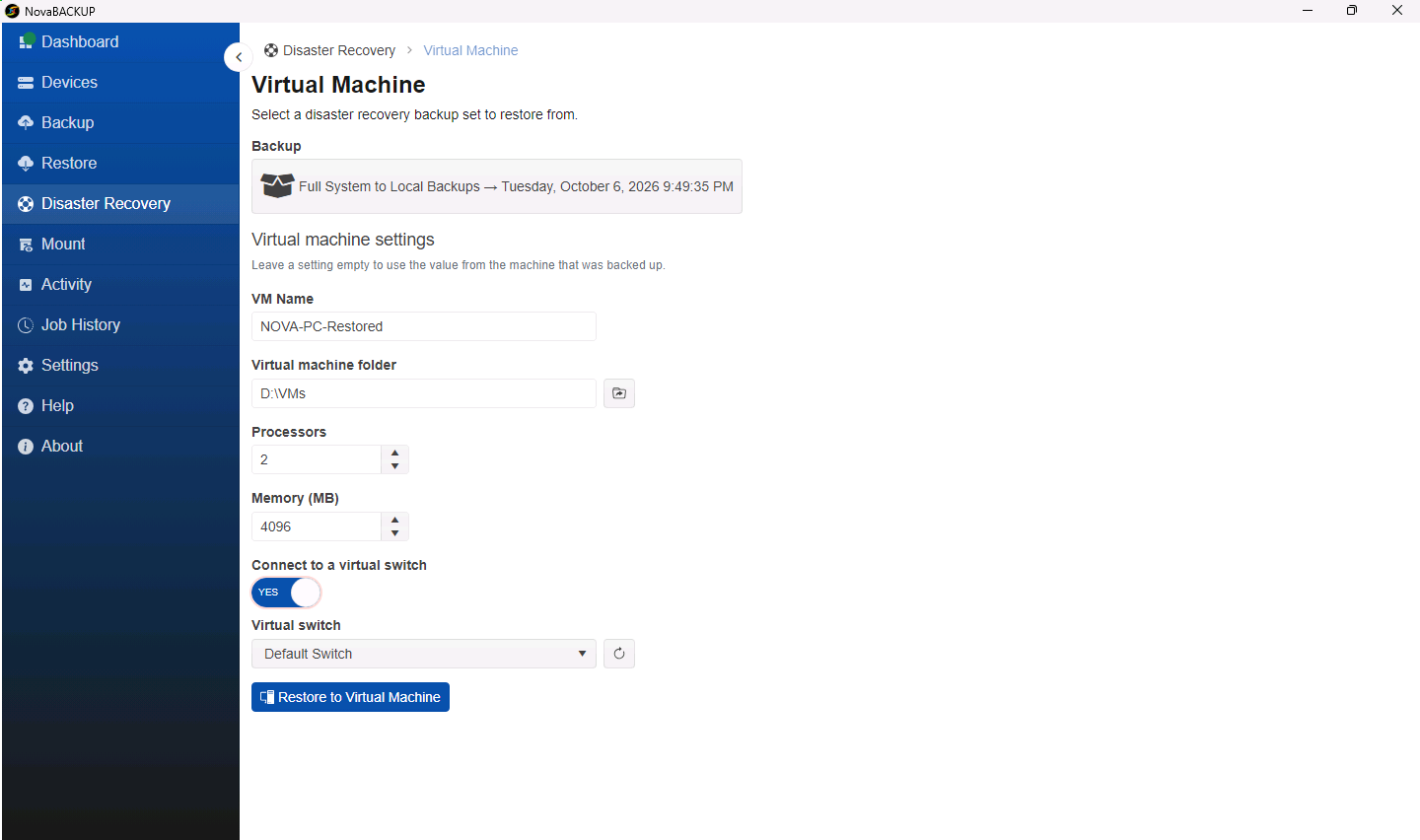
One quick option is to boot your system as a Hyper-V virtual machine. With the new Disaster Recovery feature in NovaBACKUP, you can recover a local or cloud system backup as a Hyper-V VM directly from the NovaBACKUP client. Once the restore process is complete, you can start the Hyper-V VM immediately, eliminating the need for manual steps, such as restoring to a VHDX or booting from recovery ISO media.
Now you can:
- Test restores without affecting production. Restore to a VM on an unconnected or private virtual switch, start it, and check that it boots, services start, and line-of-business applications and recent files open.
- Keep the business running during an outage. Restore to a VM connected to an external switch. Users can continue working on the VM while you determine what happened to the original server and rebuild it.
- Move to virtual. Convert a physical machine to a VM when the client prefers to run the server virtually.
You can boot the VM on any Hyper-V host, such as a Windows 11 Pro or Windows Server 2016 machine with the Hyper-V role enabled and sufficient disk space and memory for the restored server. For example, a small Windows 11 Pro computer in your office could serve as the recovery host.
Recover From the Cloud
You can store system backups on local storage, your own NAS, S3-compatible storage, or in the NovaBACKUP Cloud. You can also combine local and cloud storage in a single hybrid job so that local and offsite copies come from the same job and schedule. To restore your machine, boot it from the recovery media and pull the system backup directly from the cloud onto the hardware being restored.
Multi-Stream Restore
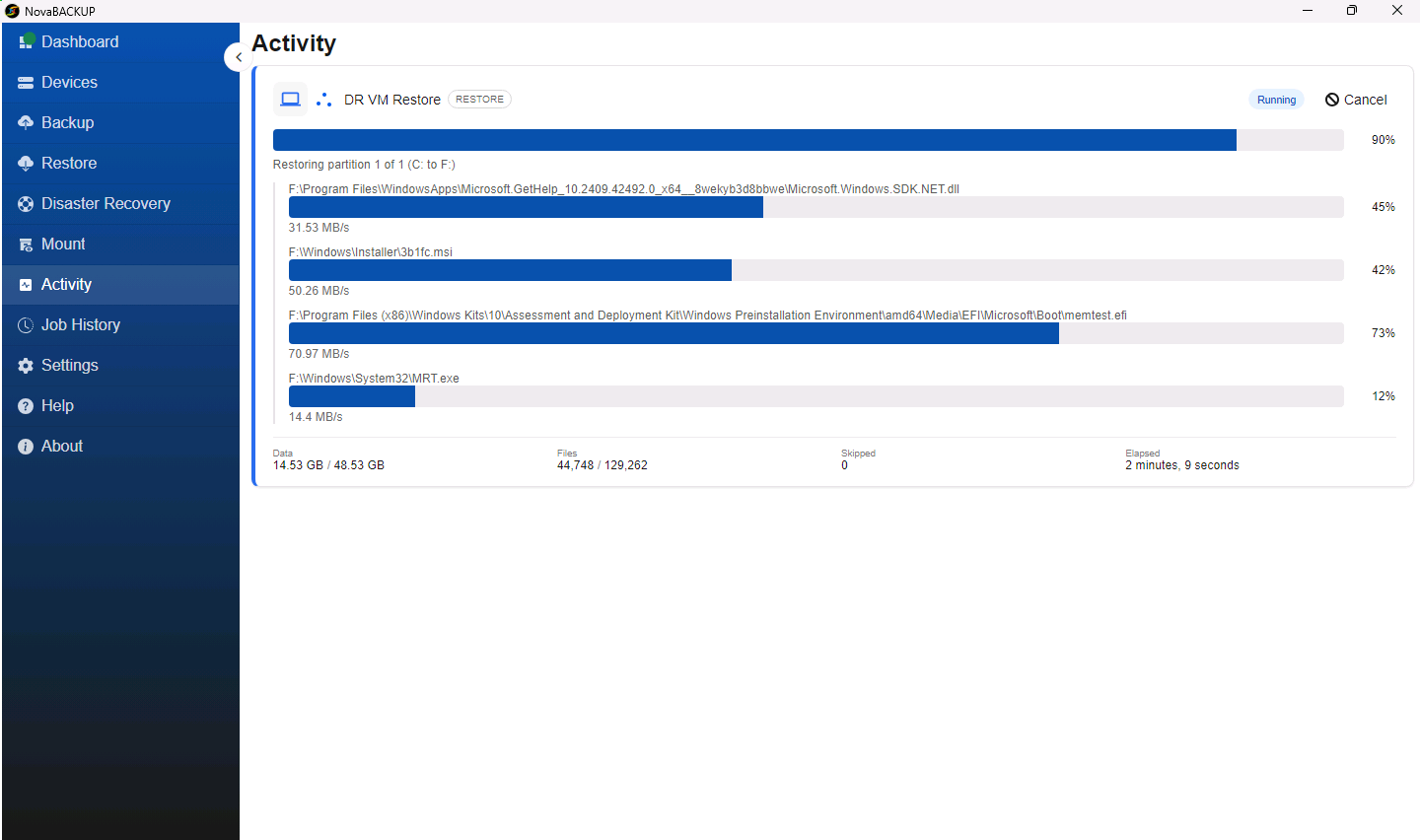
Restores that start on the local agent can run over multiple parallel streams. This speeds up the recovery of full systems and large file sets. In the restore settings, you can specify the number of streams and the number of files after which a new stream will begin.
This gives you control over how much bandwidth a restore uses. If a server's system backup is stored in the NovaBACKUP Cloud or on a slower NAS, increase the number of streams before starting the recovery process. If a large file must be restored during business hours, you can reduce the number of streams so the restore doesn't use up the entire network bandwidth.
The Redesigned NovaBACKUP Agent
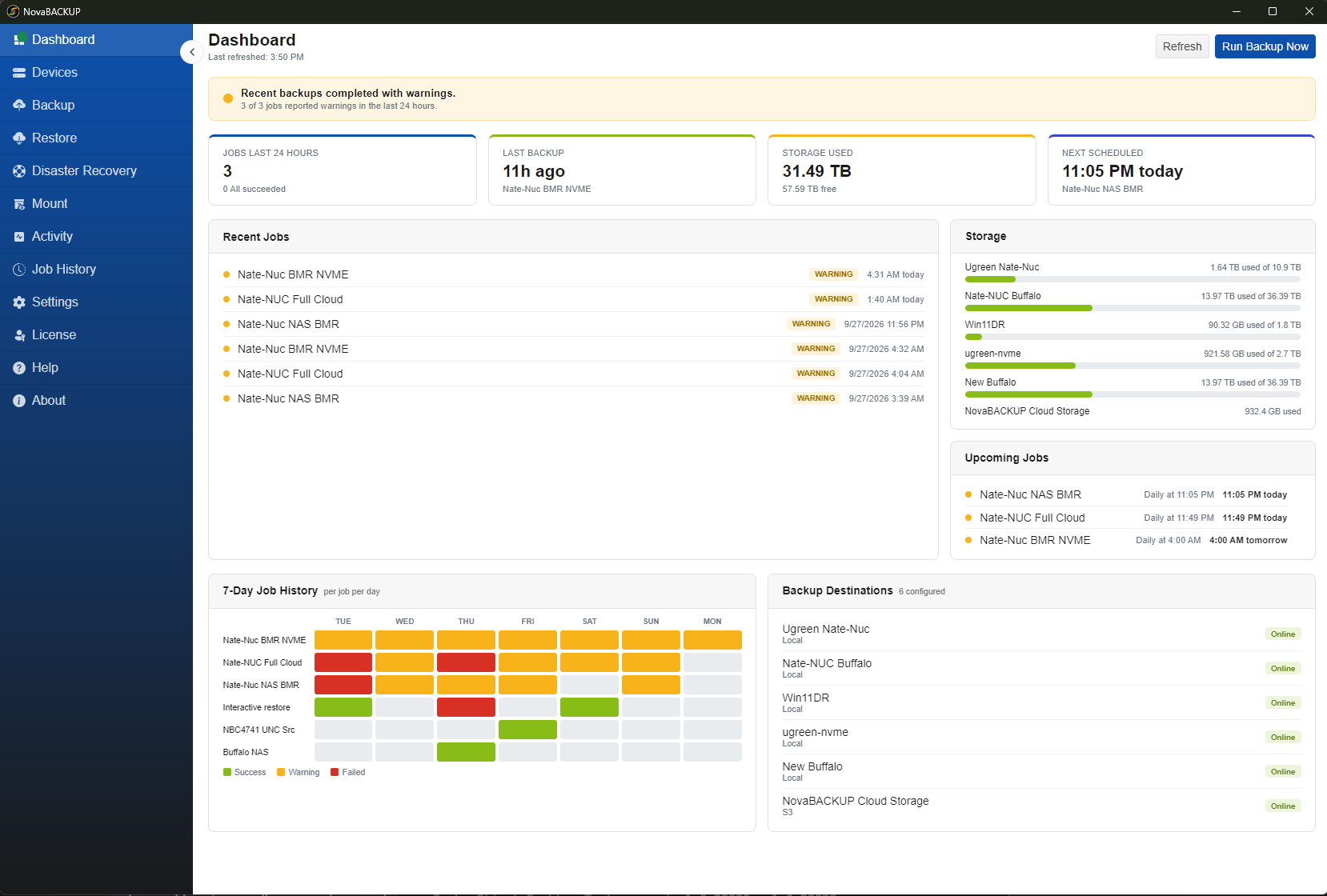
The most noticeable change in this release is the local backup client's completely redesigned interface.
- The intuitive dashboard displays the status of each backup and restore job on the machine. Now, you can easily identify what needs attention and click on any part of the dashboard to view the details and logs.
- An activity tab shows current activity, and the job history tab shows all past jobs. You can filter the job history by status, date, job type, and more.
- Restore and mount functions are now more prominent in the menu.
- When setting up for the first time, the Backup Job tab will guide you through the process.
- And much more
Additionally, the new interface is built on an API-first architecture, exposing the agent's functions through its APIs. This design makes it easier to incorporate agent-level backup operations into your RMM.
Bug Fixes and Improvements
This release includes additional improvements and bug fixes to both the central management and the agent. The changelog contains the full list, including:
- Multi-tenant improvements: Refinements to the multi-tenant management system released in the spring update.
- NAS credential handling: Improved handling of credentials for NAS backup targets.
Frequently Asked Questions
FAQ
Is the new system backup and recovery included with my license?
Yes, the new Disaster Recovery feature is included with all active licenses and subscriptions. System backup and restore is now built into the backup engine and is no longer a separate add-on.
FAQ
How do I upgrade to the October 2026 Release?
The upgrade is free for anyone with an active subscription to NovaBACKUP Managed Backup, PC Agent, or Server Agent. NovaBACKUP Managed Backup users can push the update to their agents from the central management. NovaBACKUP PC Agent and Server Agent users will receive a notification in the client or can download the update from our website.
FAQ
What happens to my existing image backup jobs after I upgrade?
Existing image backup jobs keep running after the upgrade. Editing one can require the legacy UI, and NovaBACKUP alerts you when that is the case. Create a job with the Disaster Recovery option, then remove the image backup schedule once you trust the new backups. Keep the old image backups until their retention runs out, and you can still restore from them. The October 2026 Release FAQ for Partners covers the full replacement steps.
What's Next
The October 2026 release is available starting October 22, 2026. For more information on planning your upgrade and seeing the release in action, see below:
- Overview on our What's New page
- Full Changelog for every update in detail
- Upgrade planning and requirements are in our October 2026 Release FAQ for Partners
- Watch our How-To Videos on YouTube
To see it live, join us on our launch webinar on October 29 at 8 am PT / 4 pm CET. Register here.
Request a Free TrialShare this