
Share this
by Nathan.Fouarge on Apr 27, 2026, 7:41:43 AM
Managing backup for multiple clients has always required juggling a lot of moving parts. This spring release gives you more tools to do it cleanly. It upgrades the multi-tenant user management, adds role-based permissions, and the ability to push agent updates remotely from the central management, along with a substantial list of bug fixes and reliability improvements across the board.
Whether you’re an MSP managing dozens of client environments or an IT admin who needs tighter access control, this release is built with your workflow in mind.
This post covers what's new
For the full technical details, check out:
Multi-Tenant Management
NovaBACKUP has always kept customer data separate. If you managed backup for multiple clients through an MSP account, each client’s backup data was already isolated: a client restoring their files only ever saw their own backup sets, never another client’s. What was missing was the ability to give those clients, or anyone else, their own login.
This release changes that. MSPs can now create separate accounts for each customer, so clients can log in and see only their own environment. Beyond clients, MSPs can also create accounts for team members, resellers, or agency partners, each with access scoped to exactly what they need. And admins can switch between accounts directly from the navigation menu, so they can manage each environment without logging in and out.
Key capabilities:
- Create individual accounts for customers, employees, resellers, or agency partners
- Each account holder logs in and sees only their own environment
- Users, groups, storage, and roles all scoped per tenant
- Sub-groups automatically inherit tenant membership from their parent group
- S3-compatible and cloud storage accounts can be scoped to a specific tenant
- Safety guardrails prevent accidentally deleting the default tenant or default role
Why it matters
The data isolation was always there. What this release adds is self-service visibility for the people who own that data.
Clients can log in and check their own backup status without calling you.
Reseller partners can manage their own sub-set of clients without needing access to your entire environment.
Your internal team can be structured with the right level of access for each person's role.
Use cases
- You manage backup for 30 SMB clients. You can now give each client their own login so they can check backup status and browse restore points independently, without ever seeing another client’s data or environment.
- You work with reseller partners or sub-agents who manage a subset of your clients. Create accounts for them scoped to only their clients, so they can operate independently without touching the rest of your environment.
- You’re onboarding a new client and want to set up their environment cleanly. Create their account, assign storage, add their agents, and hand them a login, all without any risk of it overlapping with your existing client environments.
Role-Based Permissions
Multi-tenant account management and role-based permissions are two sides of the same coin. Once you can create separate accounts for clients, team members, resellers, and partners, the next question is: what should each of them actually be able to do? That’s where roles come in.
What’s new
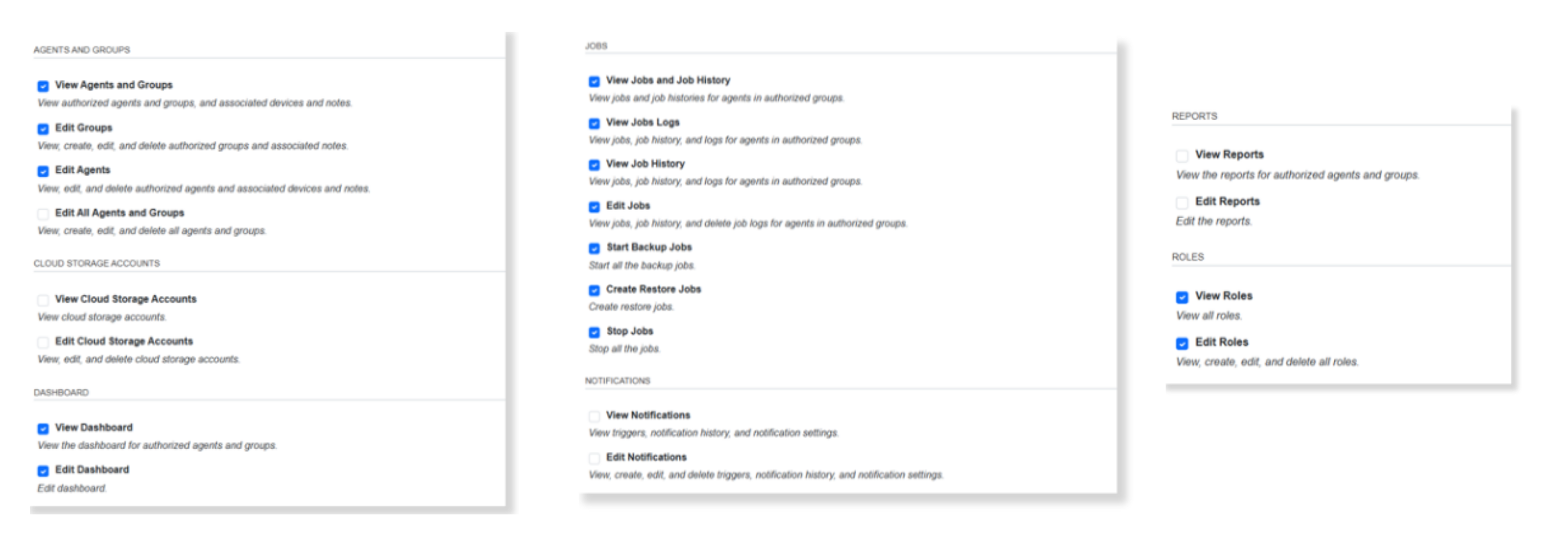
You can now build fully custom roles with granular, per-category permissions and assign them to any account you create. Permissions are organized across every major area of the central management, giving you precise control over what each person can see and do.
Permission categories include:
- Agents and Groups: view, edit, or give full control over agents, groups, and associated devices
- Cloud Storage Accounts: view or edit cloud storage configurations
- Dashboard: view or edit the dashboard for authorized agents and groups
- Jobs: view job history and logs, edit, start, or stop backup jobs, and create restore jobs
- Notifications: view or edit triggers, notification history, and settings
- Reports: view or edit reports for authorized agents and groups
- Roles: view or edit roles — with the added safeguard that users can’t create or assign roles with more permissions than they themselves have
Additional improvements include:
- View Tenants and Edit Tenants permissions can be assigned per role, controlling who can see or modify tenant-level data
- MSP sub-user creation: MSP users can create sub-users with equal or lesser permissions, including a read-only Technical MSP role for support staff who need visibility without the ability to make changes
Why it matters
The combination of multi-tenant accounts and role-based permissions means you can now model your actual business structure inside NovaBACKUP.
A client gets a login scoped to their environment.
A reseller partner gets access to their slice of your deployment.
A junior technician gets job visibility without the ability to touch configuration.
A senior admin gets everything.
Each person sees exactly what they need, and nothing they shouldn't.
Use cases
- Your level 1 support technicians need to check backup job status and review logs, but shouldn’t be able to modify jobs or change storage settings. Assign them a role with view-only access to Jobs and Dashboard, and they get exactly the visibility they need, nothing more.
- You give a client their own login scoped to their tenant. You want them to be able to see their backup status and create restore jobs, but not edit backup jobs or touch storage configuration. Build a role with those exact permissions and assign it to their account.
- A reseller partner manages a subset of your clients. They need full control over their clients’ agents and jobs, but shouldn’t be able to see your other clients or modify your storage accounts. Scope their account to their tenant and assign a role with the appropriate permissions.
Push Remote Agent Updates
Keeping backup agents up to date across a large environment used to mean remoting into every single client environment individually to run the update. This release takes that off your plate.
What’s new
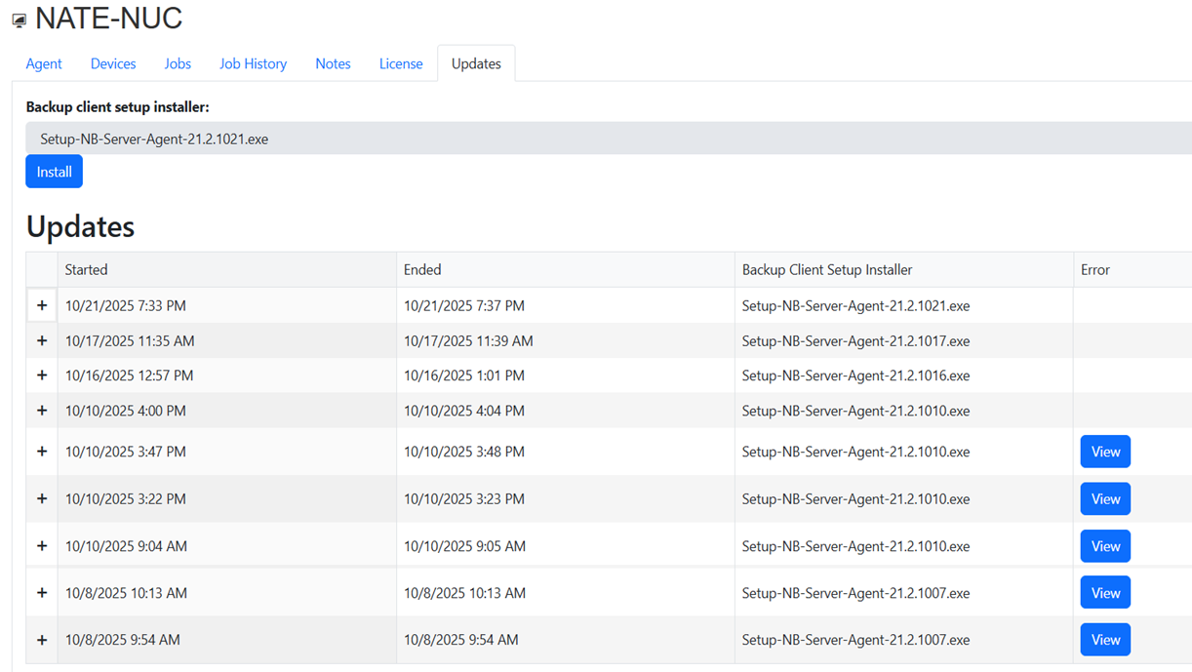
You can now push backup client updates directly to any connected agent from the agent details page in central management. No need to coordinate with end users, schedule maintenance windows manually, or touch each endpoint individually.
The update session history panel gives you full visibility into each update, including:
- Which processes ran
- Any messages logged during the update
- Files involved, with the ability to download logs for review
Why it matters
Running outdated backup clients is a real risk. For MSPs managing many endpoints, staying current used to require either interrupting clients or building your own deployment workflow.
Bugs go unfixed and compatibility issues crop up when clients run outdated versions.
You lose access to the latest improvements — features, performance gains, and security fixes included.
Now it's a few clicks from the web dashboard — no client interruption, no custom deployment workflow.
Use cases
-
A new backup client version ships with a critical fix. Instead of coordinating with each client to schedule a maintenance window, you push the update to all affected agents from the central management during off-hours. Done before anyone starts their workday.
-
An agent at a client site has been running an older version and you’re seeing inconsistent backup behavior. You push the update remotely, review the session log to confirm it completed cleanly, and close the ticket, all without dispatching a technician or asking the client to do anything.
-
You’re rolling out an update across a large environment and want to verify each agent updated successfully before moving on. The update session history in the central management gives you a full audit trail per agent, so you can spot any failures and rerun as needed.
Bug Fixes and Improvements
This release includes an extensive list of fixes and improvements across both the management console and the backup client. The full changelog has everything, but here are a few fixes worth calling out specifically.
Reliability and data integrity
- Hyper-V and SQL in a single job on non-English OS: Combined Hyper-V and SQL backup jobs now work correctly on non-English operating systems.
- Restoring multiple VMs or SQL instances to alternate locations: NovaBACKUP now creates a separate folder per VM or SQL instance when restoring to an alternate location, preventing files from overwriting each other.
- Mount function now works with plugin backups: The Mount function previously failed whenever SQL, Hyper-V, or System State data was included in the same backup job as regular files. That’s now fixed.
Management console and usability
- Network device credential checks: Network devices now pass credential validation even when there’s already an open connection, eliminating false failures during credential checks.
- UI fixes: Several interface issues have been resolved, including missing field labels, scroll bar behavior, and fields that weren’t displaying correctly.
- Group management fixes: A series of group management bugs have been resolved, including agents disappearing when dragged to new groups, errors when deleting groups with sub-groups, and issues for users with sub-group-only access.
- Performance improvements: General performance improvements for retention and restores. The Run As tab in file backup job settings also loads significantly faster.
Frequently Asked Questions
FAQ
Does multi-tenant management require a separate license per tenant?
No. Multi-tenant management is part of NovaBACKUP's Central Management and does not require additional licenses per tenant. Your existing license covers the feature. Individual agents within each tenant consume licenses as they normally would.
FAQ
Can a user belong to more than one tenant?
Yes. Users can be assigned to one or more tenants. This is useful for senior admins or account managers who need visibility across multiple client environments without needing separate logins.
FAQ
What happens to existing users and agents when I start creating tenant accounts?
Your existing setup continues to work as before. Your agents, users, and backup data all remain associated with the default MSP account. Creating new tenant accounts is additive: you can start building out scoped accounts for clients, team members, or partners at your own pace without disrupting any existing backup operations.
FAQ
Can I create custom roles, or am I limited to predefined ones?
You can create fully custom roles. Permissions are organized by category: Agents and Groups, Cloud Storage Accounts, Dashboard, Jobs, Notifications, Reports, and Roles. Within each category you can set view-only or full edit access, giving you precise control over exactly what each account holder can see and do. Predefined roles like the read-only Technical MSP role are available as starting points, but you're not limited to them.
FAQ
Can I push updates to all agents at once, or only one at a time?
You can push updates to individual agents from the agent details page in the central management. Use the session history to track completion status per agent and confirm everything updated cleanly.
FAQ
Does the agent need to be online to receive a pushed update?
Yes. The agent needs to be connected to the central management to receive a pushed update. If an agent is offline at the time, you can trigger the update once it reconnects. The session history will reflect the status, so you always know which agents have been updated.
FAQ
Are the Hyper-V and SQL backup improvements available on all supported operating systems?
Yes. The fix specifically addresses combined Hyper-V and SQL backup jobs that were failing on non-English operating systems. This is now resolved across all supported OS languages.
What's Next
These updates are rolling out now. To learn more or get hands-on:
What's New page
Full feature overview
Full Changelog
Every update in detail
Getting started guide
Set up Managed Backup
How-To Videos
Watch on YouTube
Share this
