
Share this
by Bridget.Giacinto on Apr 7, 2015, 9:15:32 AM
The worldwide cloud storage market is skyrocketing, and so is the volume of data fueling its growth. By 2018, over 2 billion consumers will be using some form of cloud storage, relying on it every day to store photos, documents, and personal files. In the business world, over $30 billion will be spent on cloud computing globally by the end of 2015, as organizations of all sizes move workloads, applications, and data protection strategies into the cloud.
This rapid growth is transforming how data is stored, accessed, and protected. Businesses are looking for ways to safeguard critical information, meet regulatory requirements, and ensure they can recover quickly from incidents like ransomware, hardware failure, or natural disasters. Cloud backup plays a key role in these strategies by providing off-site copies of data that can be restored when something goes wrong.
The industry is exploding… yet there is still confusion. Many people use terms like “cloud storage,” “file sync,” and “cloud backup” interchangeably, even though they serve very different purposes. If you are considering taking the plunge into cloud backup, but are still unsure what cloud backup actually means—or how it differs from simple cloud storage—we can help clarify it for you.
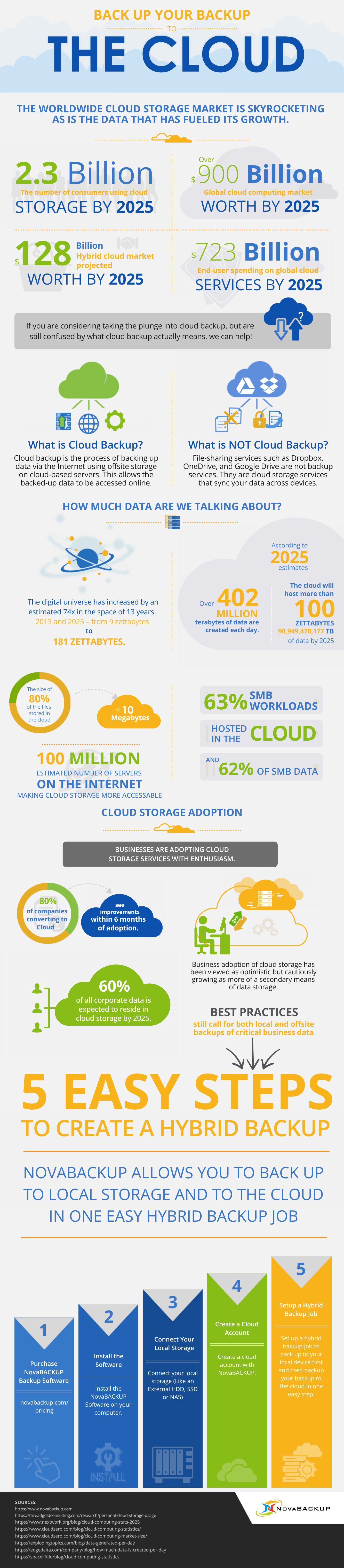
Check out this infographic to learn what is and is NOT cloud backup, explore fun facts about the size of our digital universe, review stats on cloud storage adoption, compare popular free cloud storage options, and follow 5 easy steps on how to back up your backup in the cloud so your data is protected even if your primary backup fails.
Copy the code below to share this on your own blog!
What is Cloud Backup?
Cloud backup refers to the backup of data transferred over the internet utilizing off-site storage on cloud-based servers, which allow data to be accessed on demand via the internet from cloud computing service providers.
What is NOT Cloud Backup?
File sharing services like Dropbox, OneDrive, and Google Drive are NOT backup; they are cloud storage, and they provide file syncing services. However, you can use cloud storage to back up your backup in the cloud.
For more information on backing up your backup in the cloud using free cloud storage, check out our blog post on how to backup your backup to cloud file syncing services.
Share this
