
Share this
by Bridget.Giacinto on Feb 13, 2014, 10:40:47 PM
FACT: Hard drives don't last forever. They are mechanical devices with moving parts that wear out over time, and they can fail without warning due to age, power surges, overheating, or simple manufacturing defects. The reality is, each week in the United States 140,000 hard drives crash, taking business documents, financial records, and irreplaceable photos with them.
If you don't want to be part of that statistic, you need to take action now and stop putting your data at risk. Relying on “it hasn’t failed yet” is not a strategy. A single unexpected crash can mean days of downtime, costly data recovery attempts, or permanent data loss.
The good news is that backing up your computer is easier and more secure than ever. Modern backup solutions can automatically protect your files on a schedule, store copies both locally and in the cloud, and encrypt your data so it stays safe and private. You don’t have to be a technical expert, and you don’t have to spend hours managing it—once it’s set up, it just works in the background.
Don’t wait until you become another hard drive failure story—back that computer up!
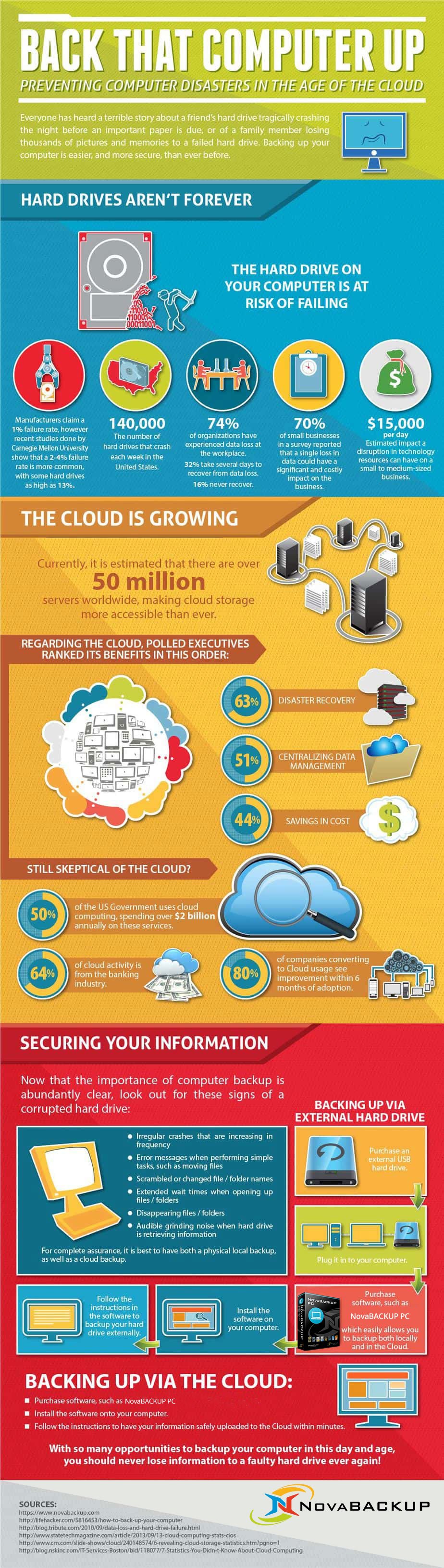
Everyone has heard a terrible story about a friend's hard drive tragically crashing the night before an important paper is due, or of a family member losing thousands of pictures and memories to a failed hard drive. For businesses, the stakes are even higher—an unexpected failure on a workstation or server can mean losing client files, patient records, financial data, or the documents you need to stay compliant.
The truth is, these stories are completely avoidable. With so many reliable ways to back up your computer in this day and age—local external drives, network storage, and secure cloud backup—you should never lose information to a faulty hard drive ever again. Automated backup software can quietly protect your files in the background, create multiple copies in different locations, and make it easy to restore a single file or an entire system when something goes wrong. A few minutes spent setting up a proper backup today can save you from hours, days, or even weeks of disruption tomorrow.
Copy the code below to share this on your own blog!
Share this
